
To improve your setup without buying twice, start by evaluating your current hardware and identifying parts that can be upgraded, like adding more RAM or switching to a faster SSD. Focus on software optimization, such as syncing apps and updating drivers, to boost performance. Research compatible components and prioritize long-term upgrades that fit your needs. By making targeted improvements, you’ll maximize your tax refund and get better value. Continue to explore smart strategies to enhance your tech setup effectively.
Key Takeaways
- Research compatible hardware components and software solutions to ensure effective upgrades without unnecessary replacements.
- Prioritize small, strategic hardware upgrades like RAM or SSD to extend device lifespan cost-effectively.
- Optimize existing hardware through cleaning, driver updates, and firmware upgrades before considering new purchases.
- Focus on software integration to streamline workflows and reduce redundancy, improving efficiency without hardware changes.
- Plan upgrades with future-proof features and compatibility in mind to maximize long-term value and avoid double spending.

If you’re expecting a tax refund this year, now is the perfect time to start planning how to upgrade your finances. Instead of rushing to spend the money on fleeting pleasures, consider how you can make strategic improvements to your setup that will pay off long-term. One key area to focus on is your technology infrastructure. Upgrading your devices and systems can greatly boost your productivity and entertainment experience, but it’s essential to do so thoughtfully to avoid purchasing unnecessary duplicates or wasting funds.
Start by evaluating your current hardware. Are your devices outdated or struggling to keep up with your needs? If so, replace or upgrade components selectively. For example, instead of buying a whole new computer, consider upgrading your RAM or SSD to extend the lifespan and performance of your existing setup. This approach maximizes your investment and prevents redundancy. When upgrading hardware, pay attention to hardware optimization—optimize your existing devices by cleaning out unnecessary files, updating firmware, and installing the latest drivers. These small but impactful steps can breathe new life into your current hardware, making it feel almost new without the cost of a full replacement.
Upgrade your hardware selectively and optimize existing devices to boost performance without unnecessary replacements.
Beyond hardware, software integration plays a vital role in creating a seamless, efficient environment. If you’re juggling multiple apps or platforms that don’t communicate well, it’s time to look into software solutions that enable better integration. For instance, syncing your calendar with task management tools or consolidating your email accounts into a unified platform can save you time and reduce frustration. Proper software integration ensures that your workflow flows smoothly, reducing the need for redundant tasks and minimizing the risk of errors. Before investing in new devices, explore whether existing hardware can support upgraded software or integrations, avoiding unnecessary purchases.
When approaching upgrades, plan carefully to avoid buying twice. Research compatible hardware components and reliable software solutions beforehand. Look for cross-platform compatibility and future-proof features, so your investments remain useful for years to come. Remember, the goal is to enhance your current setup, not to replace everything at once. Sometimes, a simple software update or a small hardware upgrade can deliver the improvements you need without the expense and hassle of new purchases. Additionally, understanding the importance of a high contrast ratio can help you prioritize upgrades that significantly improve your viewing experience, especially for home theater setups.

CORSAIR Vengeance SODIMM DDR4 RAM 16GB (1x16GB) 3200MHz CL22-22-22-53 1.2V Intel AMD Laptop Notebook Memory – Black (CMSX16GX4M1A3200C22)
Compatibility: Auto-overclocking with compatible laptop/notebooks (no BIOS configuration required).
As an affiliate, we earn on qualifying purchases.
As an affiliate, we earn on qualifying purchases.
Frequently Asked Questions
How Can I Estimate My Potential Tax Refund Before Upgrading?
You can estimate your potential tax refund before upgrading by performing pre-upgrade calculations using refund estimation tools. Start by gathering your recent tax documents and inputting your income, deductions, and credits into these tools. This way, you get an accurate picture of your expected refund, helping you decide whether an upgrade is worth it. Always double-check your inputs to guarantee your estimate reflects your current financial situation.
What Common Mistakes Should I Avoid During Refund Planning?
During refund planning, avoid common mistakes like overlooking eligible deductions or credits, which can hurt your refund optimization. Don’t ignore changing tax laws or miscalculate expenses, as these errors can reduce your refund. Always double-check your entries and stay organized with your receipts. Rushing through the process or neglecting to consult a tax professional can lead to costly mistakes. Stay thorough, stay informed, and guarantee your tax planning is accurate for the best refund outcome.
Are There Specific Tools or Software Recommended for Upgrade Planning?
For upgrade planning, you should explore software recommendations like Trello, Asana, or Microsoft Planner, which help you organize tasks and timelines effectively. These upgrade planning tools enable you to visualize your setup improvements, track progress, and avoid unnecessary purchases. By using these tools, you guarantee your upgrade process is streamlined, cost-efficient, and well-managed, ultimately helping you upgrade your setup without buying twice or making costly mistakes.
How Does Upgrading Impact My Future Tax Obligations?
Upgrading your setup is like planting seeds for a thriving garden, shaping your future harvest. When you upgrade, it can influence your tax liability—potentially lowering it through better organization and increased future deductions. These improvements might also create opportunities for strategic tax planning, making sure you maximize benefits. Keep in mind, thoughtful upgrades help you stay ahead, ensuring your financial landscape flourishes without unexpected burdens down the road.
Can I Upgrade My Setup if My Financial Situation Changes Mid-Year?
Yes, you can upgrade your setup if your financial situation changes mid-year. Start by making budget adjustments to accommodate the new expenses, ensuring you don’t overspend. Use expense tracking tools to monitor your spending and see where you can reallocate funds. This way, you can confidently improve your setup without risking financial strain, and you’ll stay on top of your overall financial health throughout the year.

Ediloca EN600 PRO SSD 256GB PCIe 3.0 Gen 3×4, NVMe M.2 2280, Up to 1400MB/s, Internal Solid State Drive, SLC Cache 3D NAND TLC, Graphene Cooling Sticker, Storage for PC, Desktop and Laptops
【Excellent Performance】EDILOCA EN600 Pro M.2 SSD adopts NVMe1.3 technology to upgrade your PC performance to load up faster…
As an affiliate, we earn on qualifying purchases.
As an affiliate, we earn on qualifying purchases.
Conclusion
By planning your tax refund upgrade carefully, you can avoid unnecessary expenses and make smarter investments. Did you know that over 60% of people miss out on potential upgrades because they don’t plan ahead? Take the time now to assess your needs, budget wisely, and upgrade your setup efficiently. With a little strategy, you can enjoy better tech without paying twice – turning your tax refund into a smart, lasting investment.
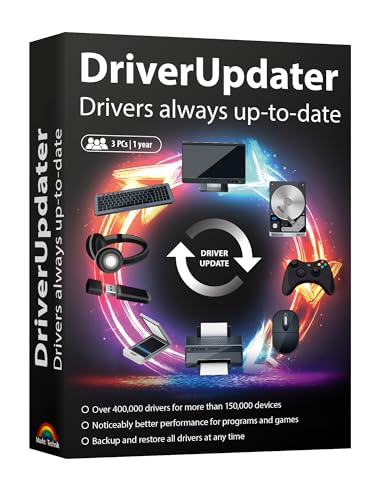
DriverUpdater – Automatically update Windows device drivers, faster and more stable Windows for Win 11, 10, 8, 7
Games and applications bogged down by outdated drivers run smoothly again and start faster.
As an affiliate, we earn on qualifying purchases.
As an affiliate, we earn on qualifying purchases.

Music Software Bundle for Recording, Editing, Beat Making & Production – DAW, VST Audio Plugins, Sounds for Mac & Windows PC
No Demos, No Subscriptions, it's All Yours for Life. Music Creator has all the tools you need to…
As an affiliate, we earn on qualifying purchases.
As an affiliate, we earn on qualifying purchases.