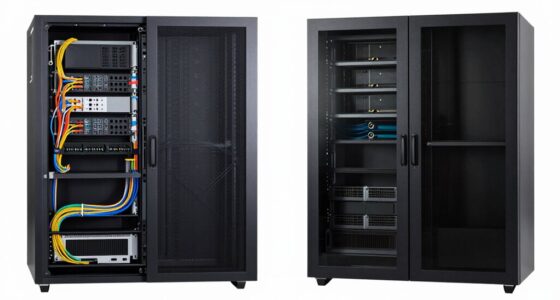

Rearranging your server racks into a hot aisle/cold aisle layout can immediately boost cooling efficiency. By aligning rack fronts facing each other for the cold aisle and backs facing for the hot aisle, you prevent hot and cold air from mixing. This setup allows cool air to reach your equipment more directly and hot air to escape efficiently. Keep exploring for more tips on optimizing airflow and keeping your system cool.

Get audio and creator gear delivered free — and shop member deals
- Fast, free delivery on millions of items
- Access to Prime Big Deal Days deals on October 6–7
- Prime Video, Amazon Music and more included
Key Takeaways
- Implement a hot aisle/cold aisle arrangement to separate hot and cold air zones instantly.
- Rearrange equipment to avoid obstructing airflow pathways and vents.
- Use blanking panels in unused rack spaces to prevent hot air recirculation.
- Elevate or stagger high-heat devices for better airflow circulation.
- Install or optimize fans and containment systems to enhance airflow and cooling efficiency.

If your server racks are overheating, changing the layout can notably improve cooling efficiency. The way you organize your equipment directly impacts airflow optimization and thermal management, two critical factors in preventing heat buildup. When servers are packed tightly or arranged haphazardly, hot air can become trapped, reducing the effectiveness of your cooling systems. By adjusting the rack layout, you can create a more direct airflow path, allowing cool air to reach hot spots and hot air to exit efficiently.
Start by ensuring that hot and cold air zones are clearly separated. This means positioning the equipment so that cool intake air flows directly into the front of the servers, with hot exhaust air expelled at the back. Implementing a hot aisle/cold aisle arrangement can markedly enhance thermal management. In this setup, you align all the fronts of the racks facing each other, creating a cold aisle, and the backs facing each other, forming a hot aisle. This separation minimizes the mixing of hot and cold air, making your cooling system more effective and reducing energy costs.
Separate hot and cold air zones with a hot aisle/cold aisle setup to improve cooling efficiency and reduce energy costs.
Next, consider the placement of high-heat-generating devices. Position these units in areas where they won’t obstruct airflow or cause hot spots. Elevate or stagger equipment if possible, so air can circulate freely around each component. Avoid blocking vents or airflow pathways with cables or other obstructions, as these can disrupt airflow optimization. You might also want to install blanking panels in unused rack spaces to prevent hot air from recirculating within the rack. These small adjustments help maintain consistent thermal management and prevent localized overheating. Additionally, proper airflow management is essential for maintaining an efficient cooling environment. Ensuring adequate ventilation can further enhance temperature regulation and prevent hotspots.
Furthermore, evaluate your cooling infrastructure. If you notice persistent hotspots or uneven temperatures, it might be time to invest in additional fans, cold aisle containment, or more efficient air conditioning units. Properly positioning fans to direct airflow where it’s needed most can make a noticeable difference in thermal management. Ensuring proper airflow management is essential for preventing heat buildup and maintaining optimal server performance. Remember, the goal is to create a steady, unimpeded flow of cool air in and hot air out, which is best achieved through strategic rack layout changes.
server rack hot aisle cold aisle containment
As an affiliate, we earn on qualifying purchases.
As an affiliate, we earn on qualifying purchases.
Frequently Asked Questions
How Often Should Rack Layouts Be Reviewed for Cooling Efficiency?
You should review your rack layout for cooling efficiency at least quarterly. Regular checks help you optimize rack airflow, guaranteeing hot spots are minimized and cooling redundancy is maintained. Factors like equipment changes, added hardware, or environmental shifts can impact airflow. By consistently monitoring, you guarantee your cooling system remains effective, preventing overheating and maintaining reliable operation. Proactive reviews keep your data center running smoothly and efficiently.
Can Rack Layout Changes Impact Server Performance?
Think of your servers as a busy city, where proper airflow keeps everything running smoothly. Rack layout changes directly impact server performance by optimizing server airflow, preventing hotspots, and enhancing cooling efficiency. When you improve cooling, servers operate more reliably and efficiently. So, yes, layout adjustments can greatly boost server performance, making cooling optimization an essential part of maintaining a healthy, high-performing data center.
Are There Specific Tools to Evaluate Optimal Rack Placement?
Yes, there are specific tools to evaluate ideal rack placement for cooling optimization. You can use thermal management software and airflow modeling tools like airflow analysis software, computational fluid dynamics (CFD), and rack layout simulators. These tools analyze heat distribution and airflow patterns, helping you identify the best rack placement. By applying them, you guarantee efficient cooling, reduce hotspots, and maximize your data center’s overall performance and energy efficiency.
What Safety Precautions Are Necessary During Rack Reconfiguration?
You must prioritize electrical safety and proper equipment handling during rack reconfiguration to prevent accidents. Always disconnect power sources before moving any equipment, and wear insulated gloves and safety gear. Use appropriate tools to avoid damaging components. Make certain you follow your facility’s safety protocols, keep the workspace organized, and avoid rushing. These precautions help protect you from electrical hazards and ensure a smooth, safe reconfiguration process.
How Do Ambient Room Conditions Influence Rack Cooling Strategies?
Ambient room conditions play a vital role in your thermal management and airflow optimization strategies. High temperatures or humidity can hinder cooling efficiency, so you need to adjust your rack layout or cooling systems accordingly. Keeping the room well-ventilated, maintaining consistent temperatures, and controlling humidity levels help guarantee your equipment stays cool. Regular monitoring allows you to adapt quickly, preventing overheating and maximizing cooling performance.
rack blanking panels for data center
As an affiliate, we earn on qualifying purchases.
As an affiliate, we earn on qualifying purchases.
Conclusion
By rearranging your rack layout, you’ve opened the door to a cooler, more efficient future. Think of it as clearing the storm clouds to let sunlight shine through, illuminating your server’s potential. This simple change isn’t just a tweak—it’s a beacon guiding your equipment toward steady, reliable performance. Embrace this new path, where better airflow is the wind beneath your wings, lifting your system to heights of ideal operation and peace of mind.
server room airflow management fans
As an affiliate, we earn on qualifying purchases.
As an affiliate, we earn on qualifying purchases.
high heat server rack cooling fans
As an affiliate, we earn on qualifying purchases.
As an affiliate, we earn on qualifying purchases.
Fall Picks
fall essentials
As an affiliate, we earn on qualifying purchases.