
TL;DR

Get audio and creator gear delivered free — and shop member deals
- Fast, free delivery on millions of items
- Access to Prime Big Deal Days deals on October 6–7
- Prime Video, Amazon Music and more included
A new open-source project, CoyoPedal, runs full-size Neural Amp Modeler A2 captures in real time on a Waveshare ESP32-S3-Touch-AMOLED-2.06 board, turning it into a standalone guitar amp and effects pedal. The same firmware also compiles to WebAssembly so it can be tried in a browser without any hardware.
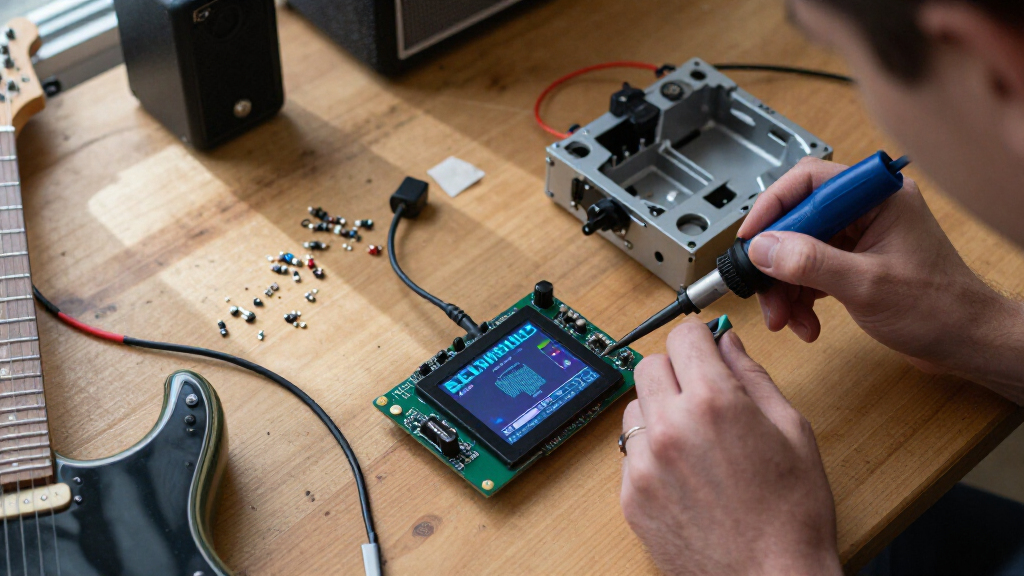
A developer has released CoyoPedal, an open-source guitar amp and effects pedal that runs full-size Neural Amp Modeler A2 captures in real time on the Waveshare ESP32-S3-Touch-AMOLED-2.06 board. According to the project’s GitHub repository, the device hosts a USB audio interface, loads user-supplied amp captures from a microSD card, and offers a touchscreen interface — with the same firmware also compiled to WebAssembly so anyone can try it in a browser with no hardware at all.
The project’s core claim is running the complete 23-layer, eight-channel WaveNet model used by NAM’s A2 format at 48 kHz on a microcontroller. The repository states the model runs in block floating point with hand-written Xtensa kernels, split across both of the ESP32-S3’s cores and processed in 64-frame blocks. On the screenless devkit build, the project reports measured load of 91% and 94% of the 1,333 microsecond block budget across the two cores, with no missed deadlines.
The device acts as a USB host for a USB Audio Class 2 interface, which handles audio input and output. It has been tested with the XTONE Pro and IK Multimedia iRig HD X, with the iRig HD 2 supported through a dedicated UAC1 profile; any interface exposing a 48 kHz UAC2 input and output should work, according to the repository, because interfaces are discovered from their USB descriptors. Around the amp model sits an effects chain: gate, compressor, chorus and drive before it, with digital delay and stereo spring reverb after it.
The touchscreen UI is written in TSX and compiled to native C++ — the project states there is no JavaScript engine on the device. Users can load their own captures by copying original .nam files to a microSD card; the pedal parses, validates and prepares them on the device itself, with no desktop converter required. Supported models are 48 kHz, eight-channel NAM A2 (‘A2-Full’) WaveNets; other architectures, sample rates and layer shapes are rejected with an error. Presets, an on-screen keyboard for naming them, a tuner with muted output, and a maintenance mode with authenticated Wi-Fi OTA updates and remote diagnostics round out the feature set — with the radios completely off while playing.
What This Means for Homebrew Amp Modeling
Neural amp modeling has until now been largely confined to desktop computers, phones and dedicated hardware like the Neural DSP Quad Cortex. Running a full-size A2 capture — not a reduced or compressed model — on a chip that costs a few dollars changes what hobbyists and small builders can make: a pedal-sized, standalone unit that loads the same captures the community already shares. Because the pedal accepts original .nam files directly from an SD card, existing capture libraries become immediately usable without conversion tools.
The browser build lowers the barrier further. According to the project, the same UI, DSP and neural amp model run as WebAssembly at coyopedal.playtaurus.com, so a guitarist with an audio interface can evaluate the sound before buying any hardware. The dual-board support also matters: the same firmware runs on a bare ESP32-S3 module with no screen at all, where the BOOT button acts as the footswitch — a path to very cheap DIY builds.
How the Project Is Built and Deployed
: “The reference hardware is the Waveshare ESP32-S3-Touch-AMOLED-2.06, which carries an ESP32-S3R8 chip, 32 MB of flash, 8 MB of PSRAM, a 410 × 502 AMOLED touchscreen, an AXP2101 power management chip and a microSD slot. The factory presets, browser build and screenshots are all built against this board. The firmware also builds for the ESP32-S3-DevKitC-1 N16R8 and bare S3R8 modules, which lack the panel, PMIC and SD slot; those boards are configured over the maintenance API using a Python tool.
The repository notes two hardware requirements regardless of board: an ESP32-S3 with 8 MB of PSRAM, because that is where the A2 model lives, and a USB port the chip can drive as a host. A bare module has no PMIC or battery path, so unlike the AMOLED board it cannot power the host port — the USB interface needs its own supply. The full VoLum capture library is published in a separate repository and can be copied to a card with a single npm command.
“The 23-layer, eight-channel WaveNet runs in block floating point with hand-written Xtensa kernels, split across both cores and processed in 64-frame blocks.”
— CoyoPedal GitHub repository
What the Repository Does Not Guarantee
The performance figures — 91% and 94% core load with no missed deadlines — are the project’s own measurements on the devkit build, not independently verified benchmarks. USB interface compatibility beyond the tested XTONE Pro, iRig HD X and iRig HD 2 is expected rather than confirmed: the repository says any 48 kHz UAC2 interface ‘should work,’ discovered from USB descriptors. First-time preparation of a new capture pauses audio for what the project says can be tens of seconds. The project does not state licensing terms, hardware availability of a finished enclosure product, or pricing — this appears to be a DIY firmware project rather than a commercial device. Details on latency figures end-to-end, and on how the build behaves with captures at the complexity limits of the A2 format, are not given.
Trying the Pedal and Following Development
Interested users can try the firmware immediately at coyopedal.playtaurus.com with a browser and a USB audio interface, or build the hardware from the Waveshare AMOLED board, a USB interface and a microSD card loaded with captures — including the published VoLum library. As an open-source GitHub project, future development would be expected to add supported boards, capture features and refinements to the effects chain; no formal roadmap is stated in the repository. Readers should watch the GitHub project for updates, issue reports on USB interface compatibility, and any community testing of third-party NAM captures.
Key Questions
What hardware do I need to build the pedal?
The reference build uses the Waveshare ESP32-S3-Touch-AMOLED-2.06, a USB Audio Class 2 interface such as the XTONE Pro or IK Multimedia iRig HD X, and optionally a microSD card with captures. The firmware also runs on an ESP32-S3-DevKitC-1 N16R8 or bare S3R8 modules, though those need 8 MB of PSRAM and cannot power the USB interface themselves.
Can I try it without buying hardware?
Yes. The same firmware is compiled to WebAssembly and runs at coyopedal.playtaurus.com, using your browser and an audio interface. According to the project, the UI, DSP and neural amp model are identical to the device build.
Which amp captures are supported?
Only 48 kHz, eight-channel NAM A2-Full WaveNet captures, including matching members of a SlimmableContainer, plus prepared .namb files. Other architectures, sample rates and layer shapes are rejected with an error.
How do I load my own captures?
Copy original .nam or .namb files to a FAT-formatted microSD card under a nam folder at its root (up to six levels of subfolders), insert the card before powering on, and select the capture from the on-screen Amp browser. First-time preparation can pause audio for tens of seconds; a cache file is stored next to the original, which is never modified.
Does it really run full neural amp models in real time on a microcontroller?
That is the project’s claim, and it provides measurements: the 23-layer, eight-channel WaveNet runs at 48 kHz using 91% and 94% of the two cores’ processing budget with no missed deadlines on the devkit build. These are the developer’s own figures and have not been independently verified.
Source: hn
Fall Picks
fall essentials
As an affiliate, we earn on qualifying purchases.