
Complete the kit


Get audio and creator gear delivered free with Prime
- Fast, free delivery on millions of items
- Prime Video, Amazon Music and more included
- Member-only deals all year
Key Takeaways
- The lineup splits into distinct setup types: conventional home theater models, short-throw projectors, and portable or gimbal-style units, so room geometry should guide the shortlist.
- The BenQ TK710 and TK710STi share a gaming focus, with the short-throw version better suited to rooms where the projector must sit near the screen.
- Triple-laser models such as the JMGO and Dangbei options emphasize color and smart viewing, while conventional laser models in the list put more focus on fixed-room projection needs.
- The ViewSonic LS740-4K’s stated 5,000 lumens make brightness its defining proposition, but a brighter projector cannot compensate for poor screen placement or uncontrolled room light.
- The AWOL Aetherion Max bundle pairs an ultra-short-throw projector with a large screen, which can simplify a living-room setup while committing buyers to a specific screen arrangement.
| ViewSonic LS901-4K 4K UHD Laser Projector |  | Best for Bright-Room Gaming | Resolution: 4K UHD (3840 × 2160) | Brightness: 5,500 ANSI lumens | Refresh rate: 240Hz | VIEW LATEST PRICE | See Our Full Breakdown |
| JMGO N1S Ultra 4K Triple Laser Projector with Google TV | 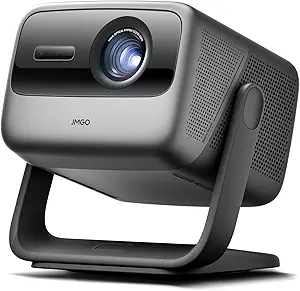 | Best for Built-In Streaming and Color | Resolution: 4K | Light source: Triple RGB laser | Brightness: 2,800 ISO lumens | VIEW LATEST PRICE | See Our Full Breakdown |
| AWOL Aetherion Max 4K 3D Ultra Short Throw Projector with 132-Inch Cinematic Screen Bundle |  | Best Ultra-Short-Throw Bundle | Native resolution: 3840 × 2160 | Brightness: 3,000 ANSI lumens | Throw ratio: 0.2:1 | VIEW LATEST PRICE | See Our Full Breakdown |
| Hisense M2 Pro Triple Laser Smart Portable Projector, 4K UHD |  | Best Portable Setup | Resolution: 4K UHD | Brightness: 1,300 ANSI lumens | Projection size: 65–200 inches | VIEW LATEST PRICE | See Our Full Breakdown |
| BenQ TK710STi 4K HDR Short-Throw Home Entertainment Projector |  | Best Short-Throw Gaming Pick | Resolution: 4K | Brightness: 3,200 ANSI lumens | Throw type: Short throw | VIEW LATEST PRICE | See Our Full Breakdown |
| BenQ TK710 4K HDR Laser Home Entertainment and Gaming Projector |  | Best for Gaming | Native resolution: 3840 × 2160 | Brightness: 3,200 ANSI lumens | HDR support: HDR10, HLG | VIEW LATEST PRICE | See Our Full Breakdown |
| Dangbei MP1 Max 4K Triple Laser Projector |  | Best All-in-One Setup | Native resolution: 3840 × 2160 | Brightness: 3,100 ISO lumens | Light source: Triple laser + LED | VIEW LATEST PRICE | See Our Full Breakdown |
| Optoma UHZ36 4K UHD Laser HDR Home Theater Projector |  | Best for Film-Focused Simplicity | Resolution: 4K UHD | Light source: Laser | HDR: Supported | VIEW LATEST PRICE | See Our Full Breakdown |
| JMGO N1S Ultimate Triple Laser 4K Projector |  | Best for Flexible Placement | Native resolution: 3840 × 2160 | Brightness: 3,300 ISO lumens | Light source: Triple RGB laser | VIEW LATEST PRICE | See Our Full Breakdown |
| ViewSonic LS740-4K 4K UHD Laser Projector, 5,000 Lumens |  | Best for Bright Rooms and Golf Simulators | Resolution: 3840 × 2160 (4K UHD) | Brightness: 5,000 ANSI lumens | Throw ratio: 1.4–2.24 | VIEW LATEST PRICE | See Our Full Breakdown |
| Dangbei DBOX02 4K Laser Projector with Google TV |  | Best for Built-In Streaming | Native resolution: 3840 x 2160 | Display type: Laser | Brightness: 2450 ISO lumens | VIEW LATEST PRICE | See Our Full Breakdown |
| JMGO N1S 4K Triple Laser Projector with Google TV |  | Best Portable 4K Laser Pick | Resolution: 4K UHD with HDR10 | Brightness: 1700 ISO lumens | Light source: Pure RGB triple laser (MALC 3.0) | VIEW LATEST PRICE | See Our Full Breakdown |
| 4K laser projector | Brightness | Light source | Resolution |
|---|---|---|---|
| ViewSonic LS901-4K 4K UHD Lase | 5,500 ANSI lumens | Laser | 4K UHD (3840 × 2160) |
| JMGO N1S Ultra 4K Triple Laser | 2,800 ISO lumens | Triple RGB laser | 4K |
| AWOL Aetherion Max 4K 3D Ultra | 3,000 ANSI lumens | — | — |
| Hisense M2 Pro Triple Laser Sm | 1,300 ANSI lumens | Triple laser | 4K UHD |
| BenQ TK710STi 4K HDR Short-Thr | 3,200 ANSI lumens | Laser | 4K |
| BenQ TK710 4K HDR Laser Home E | 3,200 ANSI lumens | — | — |
| Dangbei MP1 Max 4K Triple Lase | 3,100 ISO lumens | Triple laser + LED | — |
| Optoma UHZ36 4K UHD Laser HDR | Not specified in supplied product data | Laser | 4K UHD |
| JMGO N1S Ultimate Triple Laser | 3,300 ISO lumens | Triple RGB laser | — |
| ViewSonic LS740-4K 4K UHD Lase | 5,000 ANSI lumens | — | 3840 × 2160 (4K UHD) |
| Dangbei DBOX02 4K Laser Projec | 2450 ISO lumens | — | — |
| JMGO N1S 4K Triple Laser Proje | 1700 ISO lumens | Pure RGB triple laser (MALC 3.0) | 4K UHD with HDR10 |
More Details on Our Top Picks
ViewSonic LS901-4K 4K UHD Laser Projector
The ViewSonic LS901-4K is the gaming-focused pick for buyers who need a bright 4K image and responsive play on a large screen. Its 5,500 ANSI lumens give it more brightness headroom than the portable Hisense M2 Pro, which is rated at 1,300 ANSI lumens and is better suited to darker rooms. For fast games, the ViewSonic pairs a 240Hz refresh rate with 4.2ms input lag, while its 1.7x optical zoom gives more placement flexibility than a fixed-position setup. The tradeoff is room and installation: a 100-inch image needs about 8.7 feet, and the projector can reach 150 inches, so it is a poor fit for a cramped space. Its ceiling mount is compatible but sold separately.
Pros:- 5,500 ANSI lumens provide strong brightness for larger-screen viewing.
- 240Hz refresh rate and 4.2ms input lag suit fast-paced gaming.
- 1.7x optical zoom and image adjustments allow flexible placement.
- Supports HDR/HLG and a 21:9 aspect ratio.
Cons:- A 100-inch image requires about 8.7 feet of projection distance.
- Ceiling mounting requires a separately purchased compatible mount.
Best for: Gamers and golf-simulation users who want a bright 4K image, high refresh rate, and enough room for a large projection.
Not ideal for: Buyers with a small room or no suitable mounting plan, since large images need distance and a ceiling mount is separate.
- Resolution:4K UHD (3840 × 2160)
- Brightness:5,500 ANSI lumens
- Refresh rate:240Hz
- Input lag:4.2ms
- Aspect ratio:21:9
- Optical zoom:1.7x
- Maximum screen size:150 inches
- Light source:Laser
Our verdict“Choose the ViewSonic LS901-4K if bright-room gaming and installation flexibility matter more than compact size.”
JMGO N1S Ultra 4K Triple Laser Projector with Google TV
The JMGO N1S Ultra suits viewers who want a feature-rich movie setup without adding a separate streaming box. Its Google TV, Chromecast, and Google Assistant bring familiar streaming and casting tools onboard, while the triple RGB laser and stated ΔE<1 color accuracy target vivid, controlled color. Compared with the Hisense M2 Pro, the JMGO lists higher brightness—2,800 ISO lumens versus 1,300 ANSI lumens—but those measurements use different standards, so they do not support a direct brightness conversion. Automatic focus, keystone correction, screen fitting, and object avoidance reduce setup work. Its 20W speakers can cover casual viewing, though a dedicated sound system may still suit film watchers better. The product details do not give a throw ratio or maximum image size, making room-fit planning less clear than with the Hisense.
Pros:- Google TV, Chromecast, and Google Assistant are built in.
- Triple RGB laser and stated ΔE<1 color accuracy target detailed color.
- Autofocus and automatic image adjustments simplify setup.
- 20W dual speakers support Dolby Digital Plus.
Cons:- No maximum image size or projection distance is specified in the supplied data.
- Built-in 20W speakers may not satisfy viewers seeking theater-scale sound.
Best for: Streaming-focused movie watchers who want built-in Google TV, vivid triple-laser color, and automated picture setup.
Not ideal for: Buyers who need clearly stated projection-distance limits or plan to rely on built-in audio for a dedicated home theater.
- Resolution:4K
- Light source:Triple RGB laser
- Brightness:2,800 ISO lumens
- FOFO contrast:1,600:1
- Color accuracy:ΔE<1
- Smart platform:Google TV
- Connectivity:HDMI 2.1 (eARC), USB 2.0, Chromecast
- Audio:20W dual speakers with Dolby Digital Plus
Our verdict“Pick the JMGO N1S Ultra for integrated streaming and color-focused viewing when room-fit details are not your main concern.”
AWOL Aetherion Max 4K 3D Ultra Short Throw Projector with 132-Inch Cinematic Screen Bundle
The AWOL Aetherion Max is the room-saving cinema choice in this group: its 0.2:1 ultra-short throw is designed to create a large picture from close to the screen, and this bundle includes a 132-inch screen. That placement advantage sets it apart from the ViewSonic LS901-4K, which needs about 8.7 feet for a 100-inch image. The AWOL also combines 3,000 ANSI lumens with Dolby Vision, HDR10+, HDR10, and HLG support, plus 1ms latency, VRR, and ALLM for gaming. The large bundled screen and projector still need careful positioning, and the 300-watt draw is a real operating consideration. Its up-to-3,000,000:1 contrast figure is a stated maximum; buyers should not assume it describes every viewing condition.
Pros:- 0.2:1 ultra-short throw supports large images from close to the screen.
- Bundle includes a 132-inch screen.
- Supports Dolby Vision, HDR10+, HDR10, and HLG.
- 1ms latency, VRR, and ALLM support gaming.
Cons:- The included 132-inch screen and projector need careful placement.
- Listed power consumption is 300 watts.
Best for: Home theater buyers who want a very large screen close to the wall and also value broad HDR format support and gaming features.
Not ideal for: Viewers with limited wall space, a modest screen preference, or a priority on lower power consumption.
- Native resolution:3840 × 2160
- Brightness:3,000 ANSI lumens
- Throw ratio:0.2:1
- Image size range:80–150 inches
- Included screen:132 inches
- HDR formats:Dolby Vision, HDR10+, HDR10, HLG
- Gaming features:1ms latency, VRR, ALLM
- Light source life:25,000 hours
Our verdict“Choose the AWOL Aetherion Max bundle if you want a near-wall 132-inch setup and have room to place its large screen.”
Hisense M2 Pro Triple Laser Smart Portable Projector, 4K UHD
The Hisense M2 Pro is the flexible pick for people who want to move their projector between rooms or set it up at changing angles. Its built-in 360° horizontal and 135° vertical gimbal handles positioning, while autofocus, keystone correction, obstacle avoidance, and automatic screen adaptation reduce manual adjustments. VIDAA OS includes Netflix, YouTube, and Disney+, so everyday streaming does not require a separate device. This portability comes with a brightness tradeoff: at 1,300 ANSI lumens, it is less suited to bright rooms than the ViewSonic LS901-4K at 5,500 ANSI lumens. The Hisense supports images from 65 to 200 inches, but a larger image does not remove the need for a suitably dark viewing space. The supplied details also do not specify durability or throw distance.
Pros:- Built-in gimbal allows wide horizontal and vertical aiming.
- Autofocus, keystone correction, and screen adaptation simplify setup.
- VIDAA OS supports Netflix, YouTube, and Disney+.
- Supports a broad 65–200-inch projection-size range.
Cons:- 1,300 ANSI lumens may limit viewing in bright rooms.
- Supplied product details do not specify throw distance or durability.
Best for: People who move a projector between rooms and want flexible aiming, automatic setup, and built-in streaming.
Not ideal for: Daytime viewers in bright rooms or buyers who need stated throw-distance and durability details before planning an installation.
- Resolution:4K UHD
- Brightness:1,300 ANSI lumens
- Projection size:65–200 inches
- Gimbal adjustment:360° horizontal, 135° vertical
- Image features:4K upscaling, autofocus, auto keystone correction, obstacle avoidance, automatic screen adaptation
- Operating system:VIDAA OS
- Streaming services:Netflix, YouTube, Disney+
- Light source:Triple laser
Our verdict“Pick the Hisense M2 Pro if portability and easy repositioning matter more than bright-room performance.”
BenQ TK710STi 4K HDR Short-Throw Home Entertainment Projector
The BenQ TK710STi makes sense for buyers who want short-throw placement, strong brightness, and gaming responsiveness in one home-entertainment projector. Its 3,200 ANSI lumens and 95% Rec.709 coverage suit mixed-use rooms better than the dimmer Hisense M2 Pro, though the Hisense offers a gimbal and more automatic positioning help. BenQ specifies 4ms response at 1080p and 240Hz, which is useful for fast play but does not mean 240Hz gaming at 4K. The laser light source avoids frequent lamp replacements, and Google-certified Android TV handles streaming. Compared with the ViewSonic LS901-4K, BenQ has a short-throw design but lower listed brightness and a more narrowly specified high-refresh mode. Buyers should weigh that gaming detail against their preferred resolution.
Pros:- 3,200 ANSI lumens support viewing with some ambient light.
- Short-throw design fits rooms with limited projector-to-screen distance.
- Laser light source avoids frequent lamp replacements.
- Google-certified Android TV is built in.
Cons:- 240Hz gaming support is specified at 1080p, not 4K.
- The supplied product data does not state a projection-size range.
Best for: Console and PC gamers who need short-throw placement, ambient-light brightness, and a built-in Android TV platform.
Not ideal for: Gamers who require 240Hz at 4K, or buyers who need a stated projection-size range before checking room fit.
- Resolution:4K
- Brightness:3,200 ANSI lumens
- Throw type:Short throw
- Light source:Laser
- HDR:Supported
- Color coverage:95% Rec.709
- Gaming response:4ms at 1080p and 240Hz
- Smart TV platform:Google-certified Android TV
Our verdict“Choose the BenQ TK710STi if short-throw placement and responsive 1080p gaming matter more than 240Hz at 4K.”
BenQ TK710 4K HDR Laser Home Entertainment and Gaming Projector
The BenQ TK710 is the gaming-focused pick in this group: its 4K input lag is 16 ms at 60 Hz, and it supports 1080p gaming at up to 240 Hz with 4 ms response time. That makes it a stronger fit for fast play than the more setup-oriented Optoma UHZ36, whose listed features emphasize HDR and Filmmaker Mode. Its 3,200 ANSI lumens also help keep games visible in rooms with some ambient light, while HDR10 and HLG add support for compatible video. The tradeoff is a more limited 144-inch maximum image and no specified built-in Wi-Fi, so buyers seeking a very large image or an all-in-one streaming projector should look at the Dangbei MP1 Max. The BenQ makes the most sense when responsive gaming matters more than smart features or maximum screen size.
Pros:- Supports 1080p at up to 240 Hz with a stated 4 ms response time.
- 4K input lag is listed at 16 ms at 60 Hz.
- 3,200 ANSI lumens suit rooms with some ambient light.
- Laser light source is rated for 20,000 hours.
Cons:- Maximum image size is 144 inches, smaller than the 300-inch limits listed for the Dangbei MP1 Max and JMGO N1S Ultimate.
- Built-in Wi-Fi is not specified, so streaming may require an external device.
- The 8.4–16.3-foot throw range calls for planning projector placement.
Best for: Console and PC players who want 4K gaming with a high-refresh 1080p mode and have room for a conventional long-throw setup.
Not ideal for: Buyers who want built-in streaming, a screen larger than 144 inches, or a short-throw installation.
- Native resolution:3840 × 2160
- Brightness:3,200 ANSI lumens
- HDR support:HDR10, HLG
- Gaming response time:4 ms at 1080p/240 Hz
- Input lag:16 ms at 4K/60 Hz
- Color coverage:95% Rec.709
- Maximum image size:144 inches
- Throw distance:8.4–16.3 feet
Our verdict“Choose the TK710 if low-latency gaming and bright 4K viewing matter more to you than built-in streaming or an extra-large image.”
Dangbei MP1 Max 4K Triple Laser Projector
The Dangbei MP1 Max combines a triple laser and LED light engine with Google TV, Netflix, and built-in Dolby Audio and DTS:X speakers. That makes it a more self-contained choice than the gaming-first BenQ TK710, which has no built-in Wi-Fi specified. Its 3,100 ISO lumens and stated 110% BT.2020 color coverage suit viewers who want a bright, wide-color image, while autofocus, keystone correction, and obstacle avoidance can reduce setup work. The rotating built-in stand adds flexibility when the projector needs to point at different surfaces. Its 300-inch maximum image is useful only when the room and throw distance can accommodate it, and the listing gives no gaming latency figures to match the BenQ. I’d choose this for convenient shared viewing, not for a tightly specified competitive gaming setup.
Pros:- Google TV includes Netflix and access to streaming apps.
- Autofocus, keystone correction, and obstacle avoidance help simplify placement.
- Triple laser and LED light engine is paired with stated 110% BT.2020 color coverage.
- Built-in stand rotates horizontally and tilts vertically.
Cons:- Its 300-inch maximum image calls for substantial space and throw distance.
- No gaming response-time or input-lag figures are provided.
- Its built-in speakers may not replace a separate sound system for a dedicated theater.
Best for: Households who want a 4K projector with built-in streaming and speakers, plus automated setup for flexible room placement.
Not ideal for: Competitive gamers who need documented input-lag performance, or apartment viewers without space for a large image and long throw.
- Native resolution:3840 × 2160
- Brightness:3,100 ISO lumens
- Light source:Triple laser + LED
- Color gamut:110% BT.2020
- Maximum image size:300 inches
- Audio:Dual 12 W speakers; Dolby Audio and DTS:X
- Connectivity:HDMI 2.1 (eARC), USB, Bluetooth 5.2, Wi-Fi 6
- Stand adjustment:360° horizontal rotation; 135° vertical tilt
Our verdict“Pick the MP1 Max if you want streaming, audio, and assisted setup in one flexible projector and have space to use its large-image range.”
Optoma UHZ36 4K UHD Laser HDR Home Theater Projector
The Optoma UHZ36 has a straightforward home-theater brief: 4K UHD, a laser light source, HDR support, and Filmmaker Mode intended to preserve the director’s original vision. That focus gives it a distinct role beside the BenQ TK710, whose listed 240 Hz mode and low-latency figures make gaming its clearer strength. For viewers who want a film-oriented mode without relying on a broad feature list, the Optoma’s restrained specification set may be appealing. The tradeoff is that the supplied product data omits brightness, throw range, screen-size limits, connectivity, and operating-system details. That leaves less to judge about room fit and day-to-day flexibility than with the Dangbei MP1 Max. I’d shortlist it only when Filmmaker Mode is the priority and confirm the missing installation details before choosing.
Pros:- Supports 4K UHD resolution.
- Uses a laser light source.
- HDR support is specified.
- Includes Filmmaker Mode for film-oriented viewing.
Cons:- Brightness and contrast figures are not provided in the supplied product data.
- Throw range and maximum image size are unspecified.
- Connectivity and smart features are not described.
Best for: Movie-focused buyers who prioritize 4K laser projection, HDR support, and a dedicated Filmmaker Mode.
Not ideal for: Buyers who need known brightness, throw distance, screen-size limits, connectivity, or gaming performance before making a room-fit decision.
- Resolution:4K UHD
- Light source:Laser
- HDR:Supported
- Picture mode:Filmmaker Mode
- Brightness:Not specified in supplied product data
- Throw range:Not specified in supplied product data
Our verdict“Consider the UHZ36 for a film-first setup if Filmmaker Mode is your priority and you can verify its installation and connectivity details.”
JMGO N1S Ultimate Triple Laser 4K Projector
The JMGO N1S Ultimate stands out for placement flexibility: its rotating gimbal supports 360° horizontal rotation and 135° vertical movement, with automatic focus and keystone correction to help align the image. Its triple RGB laser engine is listed at 3,300 ISO lumens and 110% BT.2020 color coverage, while Google TV includes licensed Netflix and wireless casting. Compared with the Dangbei MP1 Max, it offers a similar large-image ceiling and built-in streaming, but the JMGO’s gimbal makes unusual projection angles its defining advantage. There are uncertainties: the listing gives conflicting audio power details, and the 300-inch maximum requires ample room. The contrast ratio is listed as 1,600:1, so buyers prioritizing documented contrast figures should weigh that alongside the broad color coverage.
Pros:- Rotating gimbal supports flexible horizontal and vertical positioning.
- Automatic focus and keystone correction assist with setup.
- Google TV includes licensed Netflix and wireless casting.
- Triple laser output is listed at 3,300 ISO lumens with 110% BT.2020 color coverage.
Cons:- Audio power is inconsistent in the product description and specs.
- The 300-inch maximum image and 25.1-foot maximum throw distance may not suit smaller rooms.
- The listing states a 1,600:1 contrast ratio, a figure buyers should weigh against their preference for darker-scene definition.
Best for: Viewers who move a projector between rooms or need to project at varied angles, and want Google TV built in.
Not ideal for: Buyers who need consistent, clearly specified audio power or a compact projection distance for a small room.
- Native resolution:3840 × 2160
- Brightness:3,300 ISO lumens
- Light source:Triple RGB laser
- Contrast ratio:1,600:1
- Color gamut:110% BT.2020
- Image size:60–300 inches
- Operating system:Google TV
- Rotation:360° horizontal; 135° vertical
Our verdict“Choose the N1S Ultimate if gimbal-based placement flexibility and built-in Google TV matter more than compact room fit or unambiguous audio specifications.”
ViewSonic LS740-4K 4K UHD Laser Projector, 5,000 Lumens
The ViewSonic LS740-4K puts brightness and installation flexibility ahead of built-in entertainment: its 5,000 ANSI lumens are the highest stated ANSI figure in this batch, and the product data specifically targets presentations in bright rooms. A 1.6× optical zoom, keystone correction, and four-corner adjustment give more placement leeway than the BenQ TK710’s listed 1.3× zoom. Golf Mode and portrait orientation also make the ViewSonic a more purpose-built option for simulator installations. The tradeoff is a longer throw: a 100-inch image requires 10.5 feet, so it won’t solve a room with limited depth. Unlike the Dangbei MP1 Max, it has no listed smart-TV platform or built-in speakers. I’d favor it for ambient-light use or golf setups, not for an all-in-one movie room.
Pros:- 5,000 ANSI lumens are suited to rooms with ambient light.
- 1.6× optical zoom and four-corner adjustment offer installation flexibility.
- Golf Mode is designed for virtual golf simulator use.
- Supports ceiling mounting, 360-degree orientation, and portrait mode.
Cons:- A 100-inch image requires 10.5 feet of projection distance.
- A compatible ceiling mount may require a separate purchase.
- Built-in streaming and speaker features are not specified.
Best for: Golf simulator owners and presenters who need a bright 4K image, flexible image adjustment, and LAN control.
Not ideal for: Small-room home theater buyers who need a short throw or want integrated streaming and speakers.
- Resolution:3840 × 2160 (4K UHD)
- Brightness:5,000 ANSI lumens
- Throw ratio:1.4–2.24
- Optical zoom:1.6×
- Screen size:30–300 inches
- 100-inch projection distance:10.5 feet
- Image adjustment:Horizontal and vertical keystone; four-corner adjustment
- Connectivity and control:HDMI; LAN control
Our verdict“Choose the LS740-4K for a bright-room presentation or golf simulator setup if you have the throw distance and separate sources and audio.”
Dangbei DBOX02 4K Laser Projector with Google TV
The DBOX02 is the easier pick for viewers who want a large 4K image and streaming ready to go. Its 2450 ISO lumens give it a brightness advantage over the portable JMGO N1S 4K, which is rated at 1700 ISO lumens, making the Dangbei a stronger fit for rooms where you cannot fully control ambient light. Google TV with licensed Netflix also cuts out the need for a separate streaming device. Autofocus, auto keystone correction, and obstacle avoidance simplify placement, while HDR10+ and Blu-ray 3D add flexibility for movie nights. The tradeoffs are its 1.7-meter minimum throw distance and built-in speakers that may not satisfy viewers seeking room-filling sound. Choose it over the JMGO if brightness and a more complete fixed-room setup matter more than portability and flexible aiming.
Pros:- 2450 ISO lumens provide more brightness than the JMGO N1S 4K’s 1700 ISO lumens
- Google TV includes licensed Netflix and access to thousands of apps
- Autofocus, auto keystone correction, and obstacle avoidance simplify setup
- Supports HDR10+, Blu-ray 3D, and images up to 200 inches
Cons:- Requires at least 1.7 meters of throw distance, limiting placement in shallow rooms
- Dual 12W built-in speakers are less suited to a theater setup than a separate sound system
Best for: Viewers setting up a living-room theater who want brighter projection and licensed Netflix without adding a streaming device
Not ideal for: People with very shallow projection space or buyers who need a compact projector they can easily carry between rooms
- Native resolution:3840 x 2160
- Display type:Laser
- Brightness:2450 ISO lumens
- Image size:60–200 inches
- Throw distance:1.7–5 meters
- Contrast ratio:5000:1
- Audio:Dual 12W speakers, Dolby Audio, DTS:X
- Smart features:Google TV with licensed Netflix, HDR10+, Blu-ray 3D, autofocus, auto keystone correction, obstacle avoidance
- Light source life:30,000 hours
Our verdict“Choose the DBOX02 for a brighter, streaming-ready home theater setup if you have enough room for its throw distance.”
JMGO N1S 4K Triple Laser Projector with Google TV
The JMGO N1S 4K is the lineup’s flexible option for buyers who move their projector or want to aim it without arranging a ceiling mount. At 4.4 pounds, it is easier to carry than a fixed-room choice such as the Dangbei DBOX02; its 127-degree gimbal lets you redirect the image, with auto focus and keystone correction helping it settle into place. The triple-laser light source and stated 110% BT.2020 coverage make color its calling card, while Google TV with licensed Netflix keeps streaming simple. It also pairs Blu-ray 3D with a stated 17ms latency for gaming. The compromise is lower brightness: at 1700 ISO lumens, it gives up headroom to the DBOX02’s 2450, so bright rooms are a tougher fit. Buyers should also be prepared to recalibrate if color tint appears.
Pros:- Light 4.4-pound design is practical for moving between rooms
- 127-degree gimbal and real-time auto focus and keystone correction allow flexible aiming
- Triple-laser light source with stated 110% BT.2020 color coverage
- Google TV with licensed Netflix, Blu-ray 3D, and 17ms stated latency
Cons:- 1700 ISO lumens provide less brightness headroom than the Dangbei DBOX02
- Color tint may require recalibration
- Active 3D glasses are required for Blu-ray 3D and may be sold separately
Best for: Renters, frequent movers, and casual gamers who want a portable 4K projector with flexible aiming and built-in streaming
Not ideal for: Viewers prioritizing brighter images in rooms with ambient light, or buyers who want color performance without possible recalibration
- Resolution:4K UHD with HDR10
- Brightness:1700 ISO lumens
- Light source:Pure RGB triple laser (MALC 3.0)
- Color coverage:110% BT.2020, 151% DCI-P3
- Maximum screen size:200 inches
- Gimbal rotation:127° vertical
- Audio:10W dual Dolby Audio speakers
- Weight:4.4 lbs
- Smart features and gaming:Google TV with licensed Netflix, Blu-ray 3D, 17ms latency
Our verdict“Pick the JMGO N1S 4K if portability and easy repositioning matter more to you than the DBOX02’s higher brightness.”

How We Picked
I compared these 12 models around the decisions that shape a 4K laser projector purchase: room distance, brightness needs, gaming use, portability, smart features, and whether the package includes a screen. I gave more weight to a clear fit for a particular viewer than to a long feature list. A projector that suits a compact living room should rank well for that buyer, even if a fixed home theater model may be a better match for a dedicated room.
The ranking reflects how clearly each option serves its stated role and how much setup flexibility it offers. Models with a strong use case—such as the BenQ gaming projectors, the bright ViewSonic LS740-4K, or the portable JMGO and Hisense units—earn distinction for that fit, while tradeoffs such as placement constraints, room-light demands, or reliance on external sources remain part of the judgment. Product specifications and bundle contents can vary by region, so buyers should confirm the exact configuration before choosing.
| 4K laser projector | Light source |
|---|---|
| ViewSonic LS901-4K 4K UHD Lase | Laser |
| JMGO N1S Ultra 4K Triple Laser | Triple RGB laser |
| AWOL Aetherion Max 4K 3D Ultra | — |
| Hisense M2 Pro Triple Laser Sm | Triple laser |
| BenQ TK710STi 4K HDR Short-Thr | Laser |
| BenQ TK710 4K HDR Laser Home E | — |
| Dangbei MP1 Max 4K Triple Lase | Triple laser + LED |
| Optoma UHZ36 4K UHD Laser HDR | Laser |
| JMGO N1S Ultimate Triple Laser | Triple RGB laser |
| ViewSonic LS740-4K 4K UHD Lase | — |
| Dangbei DBOX02 4K Laser Projec | — |
| JMGO N1S 4K Triple Laser Proje | Pure RGB triple laser (MALC 3.0) |
Factors to Consider When Choosing Best 4K Laser Projectors
Choosing among 4K laser projectors starts with the room and viewing habits, not the resolution label. These broader checks can help narrow the options before you compare individual models.
Match Throw Distance to Your Room
Measure the distance from the planned projector position to the screen, then check the image size that distance can produce. Short-throw and ultra-short-throw models can fill a large image from close to the wall, but they leave less freedom to shift the unit after installation. A conventional projector often needs a longer, fixed path, which can be awkward in a shallow room. Do not assume that a projector marked short throw will work on any shelf; furniture depth, screen height, and lens position all matter. Also check whether the image can be aligned optically or whether digital correction is required, since digital adjustments can reduce usable image area. Planning around the actual room dimensions prevents buying a projector that cannot sit where you need it.
Choose Brightness for the Room You Have
Brightness matters most when you cannot darken the room, but it does not erase the effect of daylight or bright walls. A dedicated theater can make a more moderate output look satisfying, while daytime sports in a living room place greater demands on the projector and screen. Buyers often focus on a headline lumen figure without checking how the screen size and ambient light change perceived image punch. A smaller image can look brighter than a much larger one from the same projector. Screen material and gain also affect the result, so treat projector brightness and screen choice as a pair. If you plan to watch with lights on, favor a setup designed for that room rather than expecting any laser model to overcome strong light.
Decide Whether Gaming Is a Main Use
For gaming, the 4K label is only one part of the decision: input lag, refresh support, and the console or PC connection path matter too. A projector can display a detailed image yet feel less responsive than a gaming-focused model. Check the exact mode and resolution combinations supported, since a higher refresh rate may require a different signal setting. Short-throw placement can also help keep people from casting shadows across the image. If you mostly watch films, gaming features may add little value compared with better room fit or simpler setup. Match the specification to the games you actually play rather than paying attention to a single maximum figure.
Choose Between Built-In Smart TV and External Sources
Built-in streaming can make a projector easier to use in a shared room, especially when you want a remote-based setup with fewer boxes. It also brings the usual questions about app availability, updates, and how long a platform will remain supported. An external streaming device can be replaced independently and may offer a more familiar interface, but it adds another connection and power requirement. Check whether the projector’s audio and control setup works with the devices you already own. Buyers sometimes treat smart features as a permanent advantage; in practice, they are convenient extras that can age differently from the laser light source. Choose based on how much you value a single-device setup.
Plan for Screen, Sound, and Installation
A projector is only one part of the viewing system. A flat, suitable screen can improve consistency and make placement easier, while a bare wall may introduce texture or color that dulls the image. Ultra-short-throw models are especially sensitive to surface flatness because small ripples can become visible across a large picture. Built-in speakers are handy for casual viewing, but a larger room may call for a soundbar or separate audio system. Include cable routes, ventilation space, and access to power when choosing a mounting point. Bundles can reduce coordination work, though buyers should verify screen size, mounting method, and included accessories before treating a package as complete.
Frequently Asked Questions
Will a 4K laser projector look good in a bright living room?
It can, but the room’s light level and screen size matter as much as the projector type. The LS740-4K is the lineup’s clearest brightness-led option, while a darkened room can make a broader range of models work well. Direct sunlight on the screen remains difficult for any projector to overcome. Consider curtains, a smaller image, or a screen designed for your room before choosing solely by lumen claims. If daytime viewing is essential, prioritize a setup intended for ambient light and check its performance at the image size you plan to use.
Should I choose a short-throw projector if my room is small?
Short throw can solve a distance problem, but it is not automatically the best fit for every small room. The projector still needs a suitable surface and enough clearance around furniture, and ultra-short-throw placement can be sensitive to small position changes. Measure the wall-to-unit distance and confirm the projected image dimensions before buying. A compact portable model may suit flexible use better than a fixed short-throw installation. Pick the type that matches where the projector can sit day to day.
Is a triple-laser projector a better choice for movies?
Triple-laser models in this roundup, including the JMGO and Dangbei options, make a strong case for buyers who value color-focused viewing and integrated smart features. That does not make them universally better for movies: room brightness, screen surface, picture processing, and placement still shape the result. A conventional laser model may be a better match for a fixed theater or a specific gaming setup. Compare the whole system, including how you will stream content and handle sound. Choose triple laser when its color and convenience benefits align with your room and habits.
Can I use a projector screen bundle in place of choosing a screen separately?
A bundle such as the AWOL Aetherion Max package can reduce the work of matching a projector and large screen, especially for an ultra-short-throw arrangement. Check the screen’s dimensions, mounting needs, and surface suitability for your room before relying on the bundle. A screen included in a package may not suit every wall or viewing position. If you already own a screen, compare its size and surface with the projector’s requirements rather than assuming the included one is an upgrade. The screen should fit the installation you can actually maintain.
Do I need a separate streaming device or sound system?
Not necessarily: models with Google TV or other built-in smart features can handle streaming without an extra box, and built-in audio may be enough for casual viewing. An external streamer can be useful if you prefer its apps or interface, while a separate sound system can improve dialogue and scale in a larger room. Check which connections your chosen projector provides and how they fit your existing equipment. Factor cables, power, and remote control into the setup, not just the projector itself. Add separate gear when it solves a real limitation in your viewing routine.
Conclusion
For a balanced fixed-room home theater shortlist, I’d start with the ViewSonic LS901-4K as the best overall pick. The BenQ TK710 is the best fit for gaming-focused buyers, while the ViewSonic LS740-4K makes the most sense when brightness is the leading concern. For beginners who want a simpler smart setup, compare the JMGO N1S 4K and Dangbei DBOX02 around placement and interface preferences. Buyers seeking a premium, screen-included ultra-short-throw arrangement should look closely at the AWOL Aetherion Max bundle; for portability, the Hisense M2 Pro or a gimbal-style JMGO model is a more natural direction. Choose by room layout and viewing habits first, then narrow the finalists by the features you will actually use.