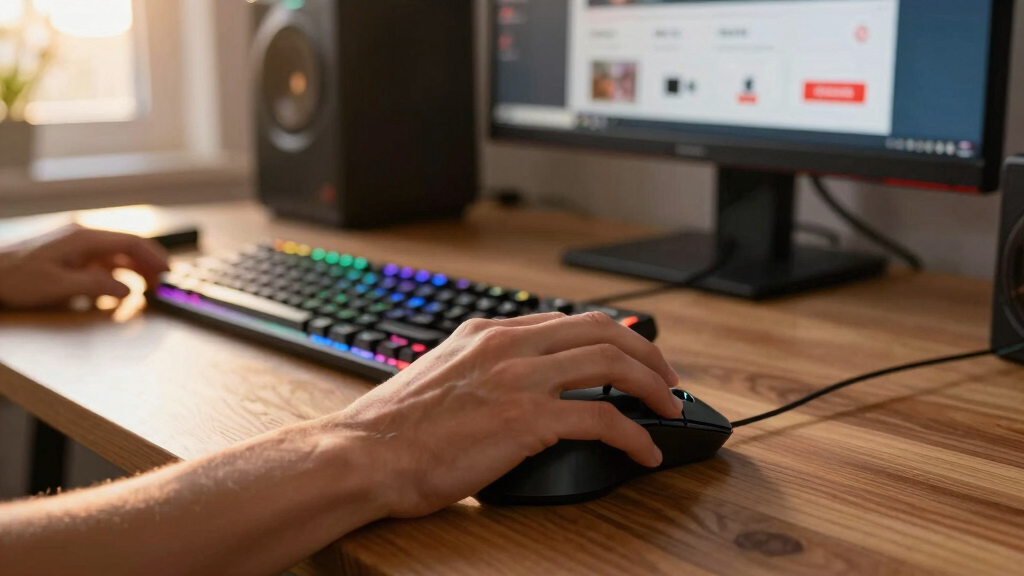

Looking for the best PC mice deals during Prime Day 2026? The right mouse can boost your productivity, enhance gaming, or simply make daily tasks more comfortable. The Macally USB C Mouse stands out as a reliable wired option for precise, quiet use, especially for Mac users. For wireless flexibility, the Keychron M7 offers high DPI and long battery life, making it ideal for multitaskers. But with so many options, balancing performance, price, and features can be tricky. Keep reading for a detailed breakdown of each product and help choosing the perfect mouse for your needs.
Key Takeaways
- Top picks balance high DPI with comfortable ergonomics for versatile use.
- Wireless options generally offer longer battery life but may sacrifice some speed or precision.
- Wired mice excel in precision and reliability, ideal for gaming or professional work.
- Budget-friendly mice often sacrifice advanced features but provide good value for casual use.
- Compatibility and connectivity options vary, so matching your devices is essential.


More Details on Our Top Picks
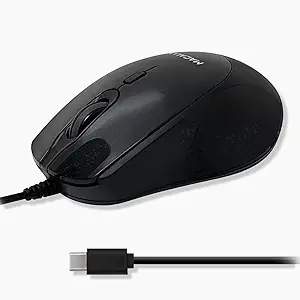
Macally USB C Mouse Wired – Precise, Comfortable, and Quiet – Type C Mouse for Mac, MacBook Pro/Air, iMac, Apple iPad, Windows Computer PC, Laptop – USBC with 4 DPI Modes
This wired mouse stands out for its simplicity and perfect compatibility with modern USB-C devices like MacBooks and iPads. Compared with wireless options, it offers a reliable, lag-free connection with zero need for batteries. Its adjustable DPI (800/1200/1600/2400) allows fine-tuning for precise work, which is vital for tasks requiring accuracy. The ergonomic, ambidextrous design makes it comfortable for long use, but as a wired mouse, it limits mobility, especially for those who prefer wireless setups. Its minimalist aesthetic pairs well with Apple devices, making it an excellent choice for users seeking a straightforward, plug-and-play mouse. However, it lacks advanced programmable buttons or customizable features found in higher-end models like the HyperX Pulsefire Haste 2 Mini.
Pros:- Seamless plug-and-play connectivity with USB-C devices
- Multiple DPI settings for precision work
- Ergonomic, ambidextrous design for comfort
Cons:- Limited mobility due to wired connection
- Lacks programmable buttons for advanced customization
Best for: Mac users or professionals seeking a reliable, simple wired mouse for daily productivity or creative work.
Not ideal for: Gamers or users who prefer wireless flexibility and extra programmable buttons for customization.
- Connectivity Technology:USB
- Additional Features:Compatible with Mac, Windows, iOS, Android
- Button Quantity:4
- Maximum Sensitivity:2400 DPI
- Range:5 meters
- Measurements:0.12 kg weight
Bottom line: This mouse is ideal for those who prioritize reliable, straightforward operation on modern USB-C devices without the need for wireless freedom.
Keychron M7 Wireless Computer Mouse, 26K DPI Optical, 2.4 GHz/Bluetooth/Wired with Macro Button 63g Lightweight Ergonomic, Up to 70 Hours Worktime for Laptop macOS/Windows – Black
This pick makes the most sense for users needing a versatile, high-precision wireless mouse that can switch seamlessly between wired, Bluetooth, and 2.4 GHz connections. It far surpasses basic models like the TENMOS in DPI (26,000 vs. 16,000) and offers a dedicated macro button for productivity or gaming customization, unlike the Macally. The lightweight 63g design and ergonomic shape are ideal for extended use, reducing fatigue during long work or gaming sessions. Its battery life of up to 70 hours on a single charge offers reliability for intensive use. However, it is pricier than simpler wired mice, and its feature set may be overkill for casual users who just need basic navigation. Its high sensitivity and customizable settings make it a perfect fit for power users and gamers alike.
Pros:- Supports multiple connection modes including Bluetooth and wired
- High 26,000 DPI sensor for precision tasks
- Lightweight and ergonomic for extended use
- Supports macros and customization via software
Cons:- Premium price point compared to basic mice
- Requires software for full customization
Best for: Power users, gamers, and professionals needing high DPI and multi-connection flexibility.
Not ideal for: Users on a strict budget or those who prefer plug-and-play simplicity without software customization.
- Connectivity Technology:2.4 GHz, Bluetooth, Wired
- Maximum Sensitivity:26000 DPI
- Weight:63g
- Range:10 meters
- Battery Life:Up to 70 hours
- Number of Buttons:6 programmable
Bottom line: This mouse suits users who need high precision, multiple connection options, and customization for demanding tasks or gaming.
Wireless Bluetooth Mouse, Rechargeable, LED, Silent, Ultra-thin Design (Bluetooth 5.2 and 2.4GHz USB Receiver) | Portable Computer Mouse for Laptops, iPads, MacBooks and Apple Devices (Black)
This compact, rechargeable mouse is perfect for users who prioritize quiet clicks and portability, making it a strong alternative to the HyperX Pulsefire Haste 2 Mini for travel or office use. Its silent operation, combined with LED breathing lights, offers a fun yet unobtrusive user experience, unlike the more gaming-oriented Pulsefire’s high-performance features. Its dual-mode Bluetooth 5.2 and 2.4 GHz support allows switching between multiple devices easily—ideal for multitasking across Mac, Windows, and tablets, similar to the TENMOS but with a sleeker design. The mouse’s slim profile and lightweight construction make it highly portable, but it lacks the high DPI or gaming-grade sensors seen in more specialized mice, which might affect gaming or precision tasks. Battery life of over a week on a single charge is practical for daily use.
Pros:- Silent, noiseless clicks for quiet environments
- Rechargeable with long battery life
- Dual Bluetooth and USB receiver modes for multi-device use
- Ultra-thin, portable design
Cons:- Lower DPI (up to 1600) compared to gaming mice
- Limited customization options
Best for: Travelers, remote workers, and multi-device users needing a silent, compact mouse for everyday productivity.
Not ideal for: Gamers or users requiring ultra-high DPI for precision gaming or design work.
- Connectivity Technology:Bluetooth 5.2, USB 2.4GHz
- Maximum Sensitivity:1600 DPI
- Range:10 meters
- Battery Life:Over 7 days
- Size:Ultra-thin
- Additional Features:LED breathing lights, silent clicks
Bottom line: This mouse is an excellent choice for those seeking a quiet, portable, multi-device mouse for everyday tasks and travel.
HyperX Pulsefire Haste 2 Mini – Wireless Gaming Mouse for PC Compact Lightweight Bluetooth 2.4GHz Black
This pick is tailored for gamers with smaller hands or those who prefer a more compact form factor without sacrificing performance. It matches the full-sized Pulsefire Haste 2 Wireless in sensor quality, featuring the HyperX 26K sensor capable of up to 26,000 DPI and tracking at 650 IPS, making it ideal for fast, precise movements. Its ultra-light 59g weight and small size make it stand out from the TENMOS or Macally, offering less fatigue during long sessions. The dual wireless connectivity (2.4 GHz and Bluetooth) provides flexibility, similar to the Keychron M7, but with a focus on gaming performance. However, its small size might not suit users with larger hands, and its premium features come at a higher price, overkill for casual users. It’s a perfect fit for competitive gaming or detailed precision work in a compact package.
Pros:- Same high-performance 26K DPI sensor as larger models
- Ultra-lightweight at 59g for quick movements
- Supports dual wireless modes including Bluetooth
- Compact size for smaller hands
Cons:- Small size may not be comfortable for larger hands
- Higher price point compared to standard mice
Best for: Gamers with smaller hands or esports enthusiasts seeking a lightweight, high-DPI wireless mouse.
Not ideal for: Users who prefer larger mice or those on a tight budget needing basic navigation.
- Connectivity Technology:2.4 GHz, Bluetooth
- Maximum Sensitivity:26000 DPI
- Weight:59g
- Range:10 meters
- Battery Life:Up to 100 hours
- Number of Buttons:6
Bottom line: This mouse excels for gamers seeking a compact, lightweight, high-precision option for competitive play.
TENMOS Wireless Bluetooth Mouse, LED Slim (Bluetooth 5.1 + USB) 2.4GHz Rechargeable Silent Bluetooth Wireless Mouse with Type C Adapter for Laptop/MacBook/iPad OS 13 and Above (Black)
This budget-friendly mouse offers silent operation and dual wireless modes, making it comparable to the TENMOS but with added versatility and a sleek, slim profile. It supports both Bluetooth 5.1 and 2.4 GHz USB, similar to the other Bluetooth mice, but at a lower cost, making it ideal for users who need a simple, quiet mouse for daily use. Its rechargeable battery and compatibility with multiple OS devices make it a flexible choice for home or office, though it lacks the high DPI or gaming-grade sensors found in the HyperX Pulsefire Haste 2 Mini. Its LED lights add a touch of fun to your setup, but overall, it’s better suited for casual or general productivity tasks rather than precision work or gaming.
Pros:- Silent, quiet clicks for distraction-free use
- Supports Bluetooth 5.1 and 2.4 GHz USB
- Rechargeable with convenient Type C charging
- Affordable price point
Cons:- Lower maximum DPI (up to 1600)
- Limited customization options
Best for: Budget-conscious users needing a quiet, multi-device mouse for everyday tasks.
Not ideal for: Power users or gamers requiring high DPI and advanced features.
- Connectivity Technology:Bluetooth 5.1, USB 2.4GHz
- Maximum Sensitivity:1600 DPI
- Range:10 meters
- Battery Life:Over 7 days
- Additional Features:LED lighting, silent clicks
- Size:Slim profile
Bottom line: This mouse is perfect for casual users seeking quiet operation and multi-device support at an affordable price.
This pick stands out for its seamless switchability between 2.4GHz and Bluetooth, making it ideal for both gamers and multitaskers who value performance and flexibility. Compared to the HyperX Pulsefire Haste 2 Mini, which is more compact, the Model O 2 Wireless offers a more ambidextrous shape suited for medium to large hands, with a weight of just 68g that enhances precision without fatigue. Its BAMF 2.0 sensor delivers up to 26,000 DPI and 650 IPS tracking, ensuring razor-sharp responsiveness, though this high-end sensor can be overkill for casual users. The long battery life—up to 110 hours on 2.4GHz and 210 hours on Bluetooth—makes it a reliable choice for long sessions, but the added tech and ambidextrous design result in a slightly higher price and complexity. Its customizable RGB lighting adds flair, but without software, the color options are limited to button controls.
Pros:- Seamless hybrid connection switch with impressive battery life
- Lightweight at 68g for quick, precise movements
- High-accuracy 26,000 DPI sensor with motion sync
Cons:- Premium price point may be a barrier for casual users
- Limited customization options without dedicated software
Best for: Gamers and power users who need a lightweight, highly responsive mouse capable of switching between tasks and devices effortlessly.
Not ideal for: Users seeking a budget-friendly or wired-only solution, as the premium features and wireless tech come at a higher cost.
- Weight:68g
- Sensor:26,000 DPI BAMF 2.0
- Connectivity:Hybrid 2.4GHz & Bluetooth
- Battery Life:110 hours (2.4GHz), 210 hours (Bluetooth)
- Buttons:6 programmable buttons
- RGB:Yes, customizable
- Shape:Ambidextrous
Bottom line: This mouse makes the most sense for gamers and professionals who prioritize speed, responsiveness, and device versatility in a wireless package.
ProtoArc Wireless Trackball Mouse, EM01 NL Ergonomic Bluetooth Rollerball Thumb Rechargeable Computer Laptop Mouse, Adjustable Angle & 3 Device Connection for PC, Mac, Windows-Gold Ball
This model excels in ergonomic comfort by allowing a customizable 0-20 degree tilt, making it ideal for users with wrist or arm strain who prefer a thumb-controlled trackball. Unlike the Keychron M7, which focuses on high DPI and fast responsiveness, the EM01 NL emphasizes natural hand positioning and long-term comfort, with a unique adjustable hinge that adapts to individual needs. Its 1600 DPI sensitivity is suitable for precise navigation, but it may fall short for fast-paced gaming or graphic design that demands higher DPI. The tri-mode connectivity—Bluetooth and 2.4G wireless—enables control of up to three devices simultaneously, perfect for multitasking across platforms like Windows, Mac, and Android. The rechargeable battery and quiet clicking improve usability over extended periods, though the control scheme may require a learning curve compared to traditional mice. The matte finish and gold aesthetic add a premium look, but the non-programmable buttons limit customization for advanced users.
Pros:- Adjustable tilt for personalized comfort
- Tri-mode connectivity for multiple devices
- Rechargeable with quiet, smooth operation
Cons:- Limited DPI at 1600; less suitable for high-speed tasks
- Buttons are non-programmable, reducing customization options
Best for: Office workers, designers, or anyone seeking a comfortable, low-strain input device with multi-device compatibility.
Not ideal for: Gamers or fast-paced users needing high-DPI responsiveness or programmable buttons, as this focuses more on ergonomics and multi-device control.
- DPI:1600
- Connectivity:Bluetooth, 2.4G wireless, multi-device
- Battery:Rechargeable
- Tilt Range:0 to 20 degrees
- Buttons:6 non-programmable
- Design:Ergonomic, matte finish
- Compatibility:Windows, Mac, Android
Bottom line: This trackball mouse is ideal for users prioritizing comfort and multi-device control over high-speed responsiveness.
How We Picked
I evaluated these PC mice based on performance, usability, build quality, and value. Priority was given to DPI range for precision, battery life for wireless models, and ergonomic design for comfort. I also considered connectivity options, compatibility with different operating systems, and user-friendly features like buttons and customization. The ranking reflects a mix of affordability, versatility, and specialized features, ensuring there’s a recommended option for different types of buyers — from casual users to gamers and professionals.Factors to Consider When Choosing Pc Mice Prime Day Deals
Choosing the right PC mouse involves considering several factors that impact daily use and long-term satisfaction. While features like DPI and battery life are important, it’s equally vital to think about ergonomics, connectivity, and compatibility. Making the wrong choice can lead to discomfort or frustration, especially if you need a mouse for extended periods or specific tasks like gaming or design work. This guide highlights key considerations to help you find a mouse that aligns with your needs and budget, avoiding common pitfalls like overpaying for unnecessary features or selecting incompatible models.Performance and DPI Range
The DPI (dots per inch) setting determines how sensitive your mouse is to movement. Higher DPI is crucial for precise tasks like gaming or design work, while lower DPI can suit casual browsing. Look for a model that offers adjustable DPI settings, allowing customization based on your activity. Be cautious of overly high DPI options if you don’t need extreme sensitivity; they can be unnecessary and drain battery faster in wireless models. Balance performance with your typical usage to avoid overspending on features you won’t utilize.
Connectivity and Compatibility
Wireless mice offer convenience and fewer cables but require reliable Bluetooth or USB receiver connections. Check if the mouse supports both, expanding flexibility across devices. Wired mice eliminate latency issues, making them preferable for gaming or professional work. Compatibility with your operating system is also key; most mice support Windows and macOS, but some may have limited features on certain platforms. Ensure the connection type and system support match your setup to prevent frustration later.
Ergonomics and Comfort
If you spend hours on your PC, ergonomic design becomes a priority. Look for mice with contoured shapes, textured grips, and adjustable buttons that fit your hand size and grip style. Compact models are portable but may sacrifice comfort for extended use, so consider your typical workload. Ambidextrous designs are versatile but may lack some tailored features for right- or left-handed users. Prioritize comfort to avoid strain or repetitive stress injuries over time.
Battery Life and Charging
For wireless models, long battery life reduces the need for frequent charging, especially if you work or game extensively. Many mice now feature rechargeable batteries and fast-charging options, which are convenient. Beware of models with short battery life or complicated charging procedures that could interrupt your workflow. For wired mice, this isn’t a concern, but durability and cable quality still matter for reliable performance.
Additional Features and Customization
Features like programmable buttons, adjustable weights, and RGB lighting can enhance your user experience. However, they often come at a higher price. Consider whether these extras are worth the investment or if they add complexity you don’t need. Simpler models tend to be more durable and easier to maintain, while advanced mice are better suited for gamers or power users who benefit from customization.
Frequently Asked Questions
Should I choose a wired or wireless mouse during Prime Day?
The choice depends on your primary use and preference for convenience. Wired mice typically offer better responsiveness and are preferred for gaming or tasks requiring precision. Wireless mice provide greater freedom of movement and reduce cable clutter, making them ideal for portable setups or general use. Keep in mind that modern wireless mice often come with long-lasting batteries and fast charging, narrowing the gap in performance for most users.
What DPI should I look for in a PC mouse?
The ideal DPI varies with usage. For casual browsing, 800-1600 DPI is usually sufficient. Gamers or professional designers may prefer higher DPI settings, like 2400 or above, for precise control. Many mice offer adjustable DPI, allowing you to switch sensitivity levels quickly. Consider your typical tasks to select a model that provides enough sensitivity without overspending on extreme settings you won’t use.
Are budget mice reliable for everyday use?
Budget mice can be perfectly adequate for basic tasks like browsing, office work, and light productivity. They often lack advanced features like high DPI or customizable buttons but tend to be more durable than their price suggests. However, they may have less comfortable ergonomics or shorter lifespan in terms of battery or build quality. If your needs are simple, a budget model can offer good value, but for intensive use, investing in a higher-quality mouse pays off in comfort and longevity.
How important is ergonomic design in choosing a mouse?
Ergonomics is vital if you spend many hours at your PC. An uncomfortable mouse can cause strain, fatigue, or repetitive stress injuries over time. Look for a shape that fits your hand naturally, with supportive contours and textured grips. Some models offer adjustable angles or customizable buttons to enhance comfort. Skipping ergonomic features might save money initially but can lead to discomfort and health issues in the long run.
What features should I prioritize for gaming mice on Prime Day?
For gaming, prioritize high DPI (2000+), fast response times, and reliable wireless connectivity if you prefer a cable-free setup. Additional features like customizable buttons, RGB lighting, and adjustable weights can improve gameplay experience. Durability is also key, so look for well-built switches and sturdy materials. Keep in mind that gaming mice tend to be more expensive, so balance your budget with the features that matter most for your game style.
Conclusion
If you’re looking for the best overall PC mouse, the Keychron M7 combines high DPI, long battery life, and versatile connectivity, making it suitable for most users. For value seekers, budget options like basic wired mice still deliver reliable performance without extra cost. Premium buyers should consider models like the Glorious Model O 2 Wireless for ultra-lightweight design and advanced features. Beginners will appreciate simple, ergonomic options like the Macally USB C Mouse, which balances ease of use with decent performance. Meanwhile, gamers or power users should focus on mice with high DPI, customizable buttons, and fast response times to enhance their experience.