For a Halloween party where the music and mood both matter, I’d start with the Numark Party Mix III: its beat-synchronized lights give a small setup instant visual energy, while its two-deck layout keeps mixing approachable. If you want to play without keeping a computer in the DJ booth, the Numark Mixstream Pro+ is the more capable choice, with a touchscreen, Wi-Fi streaming, built-in speakers, and outputs suited to a PA system. The Hercules DJControl Starlight is the compact learning pick, trading broader flexibility for a simple Serato DJ Lite setup and customizable lights.

Get audio and creator gear delivered free with Prime
- Fast, free delivery on millions of items
- Prime Video, Amazon Music and more included
- Member-only deals all year
The main choice is between built-in atmosphere, portability, and standalone control. Party Mix III puts its lights directly into a lightweight, USB-powered controller; Starlight is smaller and simpler, but its lighting is more modest and its software support narrower. Mixstream Pro+ can anchor a larger party without a laptop, though it costs more in setup complexity and requires a power outlet. I’ve ranked these for the specific demands of Halloween hosting: quick setup, room-appropriate sound connections, visual atmosphere, and how much DJ experience each asks of the host.
Complete the kit


Key Takeaways
- Party Mix III is my best overall Halloween pick for small and medium gatherings: its built-in beat-synced lights add atmosphere without a separate lighting rig.
- Mixstream Pro+ is the stronger choice for a larger, laptop-free party, with balanced XLR outputs, Wi-Fi streaming, and a touchscreen; it needs mains power and more preparation.
- DJControl Starlight is the compact learning option for a laptop-based beginner who wants basic controls and seven lighting modes in a small package.
- Check the room’s sound system before choosing: Mixstream Pro+ offers balanced XLR, while Party Mix III and Starlight rely on smaller-format stereo outputs.
- Plan the music workflow: Party Mix III and Starlight depend on compatible DJ software or an app, while Mixstream Pro+ can play standalone but requires Engine DJ preparation for stems.
| Numark Party Mix III Bluetooth DJ Controller with Built-In Lights |  | Best Overall for a Small Halloween Party | Decks: 2 | Connectivity: Bluetooth MIDI, USB-C | Lighting: Beat-synchronized built-in LED light show | VIEW LATEST PRICE | See Our Full Breakdown |
| Hercules DJControl Starlight DJ Controller |  | Best Compact Controller for Learning | Connectivity: USB | Supported software: Serato DJ Lite | Outputs: 1/8-inch stereo speaker and headphone outputs | VIEW LATEST PRICE | See Our Full Breakdown |
| Numark Mixstream Pro+ Standalone DJ Controller |  | Best Premium Pick for a Larger, Laptop-Free Party | Operation: Standalone DJ controller | Display: 7-inch HD touchscreen | Connectivity: Wi-Fi, Bluetooth audio input, USB, SD card | VIEW LATEST PRICE | See Our Full Breakdown |
| DJ controllers for Halloween partie | Connectivity | Lighting |
|---|---|---|
| Numark Party Mix III Bluetooth | Bluetooth MIDI, USB-C | Beat-synchronized built-in LED light show |
| Hercules DJControl Starlight D | USB | Seven customizable modes |
| Numark Mixstream Pro+ Standalo | Wi-Fi, Bluetooth audio input, USB, SD card | — |
More Details on Our Top Picks
Numark Party Mix III Bluetooth DJ Controller with Built-In Lights
For a host who wants the controller itself to contribute to the room, Party Mix III is my best overall pick. Its two-deck layout pairs beginner-friendly beatmatching and transition tools with beat-synchronized built-in LED lights. That means an uncomplicated setup can still feel party-ready without adding a separate lighting unit. The 8 backlit pads per deck and Stems controls give a new DJ more ways to shape a spooky playlist than simply fading between tracks, while its built-in audio interface supplies a practical route to speakers and headphones.
Compared with the Hercules DJControl Starlight, Party Mix III offers a fuller set of performance controls and a more direct lighting payoff: the lights respond to the beat, rather than asking the user to choose among lighting modes. It is also heavier and larger than the ultra-compact Starlight, though its 2.42-pound weight and USB power still make it easy to move between a desk, a kitchen table, and a party corner. Against the Mixstream Pro+, Party Mix III gives up standalone operation, a touchscreen, Wi-Fi streaming, and balanced XLR output. In return, it is more approachable as a simple controller for someone already planning to mix from a compatible laptop or mobile device.
Its connectors help define the right room. Main RCA output and a 1/8-inch headphone output suit many small speaker and headphone setups, but they are less flexible than Mixstream Pro+’s balanced XLR connection when the event uses a larger PA. The Bluetooth MIDI connection provides a wireless control option with compatible devices; it does not make this a standalone mixer or remove the need for compatible DJ software or an app. I would prepare the library and test the audio path before guests arrive rather than assume a controller alone will play music.
Choose Party Mix III if you’re learning, want the lights to be part of the setup, and value portable operation over laptop-free independence. Skip it if your party needs a robust PA connection, if you want to DJ without a computer or compatible mobile device, or if you need professional-grade lighting control. Its advantages are strongest in a casual home or small-event setting, where quick visual impact and accessible controls matter more than advanced routing.
Pros:- Beat-synchronized built-in lights add visual atmosphere without a separate lighting unit.
- Beginner-oriented beatmatching and transition tools make it more approachable than a controller focused on advanced operation.
- USB-powered, portable construction works with compatible computers and mobile devices.
- Eight backlit pads per deck and Stems controls support more creative Halloween set changes.
Cons:- Requires compatible DJ software or an app; it is not a standalone player.
- RCA main output is less suitable for some larger PA setups than the Mixstream Pro+’s balanced XLR.
- Its beginner-focused feature set may feel limited to experienced DJs seeking deeper control.
Best for: Beginner and casual DJs hosting a home or small Halloween party who want beat-synchronized lights, portable USB power, and hands-on controls.
Not ideal for: Hosts who need standalone playback, balanced XLR PA connections, or a controller intended for a large, technically involved event.
- Decks:2
- Connectivity:Bluetooth MIDI, USB-C
- Lighting:Beat-synchronized built-in LED light show
- Performance pads:8 backlit pads per deck
- Audio outputs:Main RCA output; 1/8-inch headphone output
- Mixer controls:3-band EQ, channel filter knobs, crossfader
- Power and weight:USB-powered; 2.42 pounds
- Software support:Serato DJ Lite and Algoriddim djay
Our verdict“I’d choose Party Mix III for an approachable Halloween setup where built-in beat-synced lights and portable two-deck mixing matter more than standalone operation.”
Hercules DJControl Starlight DJ Controller
DJControl Starlight is the pick I’d make for portability and a simple first step, not for the deepest Halloween setup. It is a compact USB controller designed to teach mixing with Serato DJ Lite, with deck controls, EQ buttons, a crossfader, and speaker and headphone outputs. Seven customizable lighting modes let a beginner add some color without making a separate lighting system central to the purchase. At 680 grams, it is markedly lighter than either Numark model here, a useful difference if the controller needs to fit into a small desk area or travel in a bag.
Its strongest comparison is with Party Mix III. Starlight is the more compact, simpler learning tool, but Party Mix III makes a stronger case for a Halloween gathering because its lights synchronize to the beat and its pads and Stems controls offer more performance options. Choose Starlight when the main job is learning basic transitions and the smaller footprint matters; choose Party Mix III when the controller needs to contribute more visibly to the party. Both require a software-based workflow, so neither gives the laptop-free freedom of Mixstream Pro+.
Starlight’s output choices are the clearest limitation for an event. Its 1/8-inch stereo speaker and headphone connections provide a straightforward route for a small setup, but the small-format speaker output may call for an adapter depending on the speakers or venue gear. Mixstream Pro+ is better equipped for a PA, offering balanced XLR main output alongside RCA. Party Mix III uses RCA for its main output, so it is a closer comparison for basic audio connections, though Starlight’s included speaker output is specified as 1/8-inch stereo.
The software focus also shapes who should buy it. Serato DJ Lite support keeps the learning path clear, but it is a narrower proposition than a more flexible software arrangement. The controller includes a USB cable and the software, yet the supplied details don’t describe wireless operation or built-in audio-reactive lights like Party Mix III’s. For a beginner who wants to learn from a laptop and keep the hardware unobtrusive, those omissions may be acceptable. For a host who wants an all-in-one party centerpiece, they are reasons to move up to Party Mix III or Mixstream Pro+.
Pros:- Lightweight, compact construction is easy to fit into a small practice area or carry to a gathering.
- Deck controls, EQ buttons, and a crossfader provide a simple foundation for learning transitions.
- Speaker and headphone outputs are included for a basic laptop-based setup.
- Seven lighting modes add customizable color without requiring separate lighting fixtures.
Cons:- Its specified software support is Serato DJ Lite, limiting flexibility compared with a broader software workflow.
- The 1/8-inch stereo speaker output may require an adapter for some sound systems.
- Lighting modes are less directly party-focused than Party Mix III’s beat-synchronized light show.
Best for: A new DJ who wants a very compact USB controller for practicing basic mixes with Serato DJ Lite and handling a small, laptop-based gathering.
Not ideal for: Hosts seeking beat-synchronized lighting, broader software flexibility, standalone playback, or outputs tailored to a larger PA system.
- Connectivity:USB
- Supported software:Serato DJ Lite
- Outputs:1/8-inch stereo speaker and headphone outputs
- Lighting:Seven customizable modes
- Controls:Deck controls, EQ buttons, crossfader
- Weight:680 g
- Included components:Serato DJ Lite and USB cable
- Supported platform:Windows, PC/Mac
Our verdict“I’d pick DJControl Starlight when small size and basic Serato learning matter more than expansive performance controls or a full-room lighting effect.”
Numark Mixstream Pro+ Standalone DJ Controller
Mixstream Pro+ is the most capable party hub in this lineup, especially when you want to keep a laptop off the booth or run a more involved sound setup. Its 7-inch HD touchscreen, Wi-Fi streaming, USB and SD card support, and standalone operation create a very different workflow from the computer-connected Party Mix III and DJControl Starlight. Built-in speakers can help with practice or local playback, while the balanced XLR main output gives it the clearest connection advantage for a PA. A microphone input also makes it better equipped for announcements or party hosting.
For a Halloween event, the big benefit is flexibility at the booth. A host can prepare music sources and use the touchscreen without relying on a laptop during the party, while wireless DJ lighting control can connect the music setup to compatible fixtures. This is a stronger fit for a larger room or an event with a dedicated sound system than either smaller controller. Party Mix III remains the easier pick for a beginner who wants an integrated light show and USB-powered simplicity; Starlight is much smaller and built around learning. Mixstream Pro+ earns its premium role through independent operation, output options, and a broader event-oriented setup—not simply through having more controls.
That capability has costs in planning and convenience. Unlike the USB-powered Party Mix III and compact Starlight, Mixstream Pro+ uses corded 12 V power, so it needs a suitable outlet and more room on the DJ table. Its 8.16-pound weight and 22.2-inch width make it far less grab-and-go than the other picks. Wi-Fi streaming also depends on a workable network and a compatible service, so I’d prepare local tracks or another dependable source as a backup for a party where uninterrupted music matters.
Standalone stems have a preparation requirement: tracks need to be prepared with Engine DJ Desktop, and stem functionality requires a one-time software license purchase. That makes the feature less immediate than Party Mix III’s beginner-oriented Stems controls may appear on paper. The product supports performance effects and standalone stem playback, but anyone counting on stems for live Halloween mashups should account for the prep step before the event. I’d select this model when the host values a computer-free booth, stronger PA connections, and room to grow more than quick setup or built-in beat-synchronized lights.
Pros:- Standalone operation avoids keeping a computer in the DJ setup during the event.
- Balanced XLR, RCA, and multiple headphone outputs offer more connection options for a PA and monitoring.
- Wi-Fi streaming, USB, SD card support, and a 7-inch touchscreen support a flexible music workflow.
- Built-in speakers, microphone input, and wireless lighting control suit a more complete party setup.
Cons:- Corded power and a larger, heavier body reduce portability compared with both compact controllers.
- Standalone stem playback requires Engine DJ Desktop track preparation and a one-time software license purchase.
- Streaming depends on a compatible service and reliable network access; built-in speakers do not replace a PA for a large room.
Best for: Hosts and DJs running a larger Halloween party who want standalone playback, Wi-Fi streaming, touchscreen control, built-in practice speakers, and balanced PA output.
Not ideal for: A beginner seeking an inexpensive-feeling, lightweight, USB-powered first controller, or anyone who needs a simple built-in light show with minimal preparation.
- Operation:Standalone DJ controller
- Display:7-inch HD touchscreen
- Connectivity:Wi-Fi, Bluetooth audio input, USB, SD card
- Main audio outputs:Balanced XLR and RCA
- Headphone outputs:1/4-inch and 1/8-inch
- Additional input:1/4-inch microphone input
- Power:Corded electric, 12 V
- Weight and dimensions:8.16 pounds; 11.7 x 22.2 x 2.95 inches
Our verdict“I’d choose Mixstream Pro+ for a larger Halloween event that benefits from laptop-free playback and PA-ready connections, provided I can plan for its power and stem requirements.”
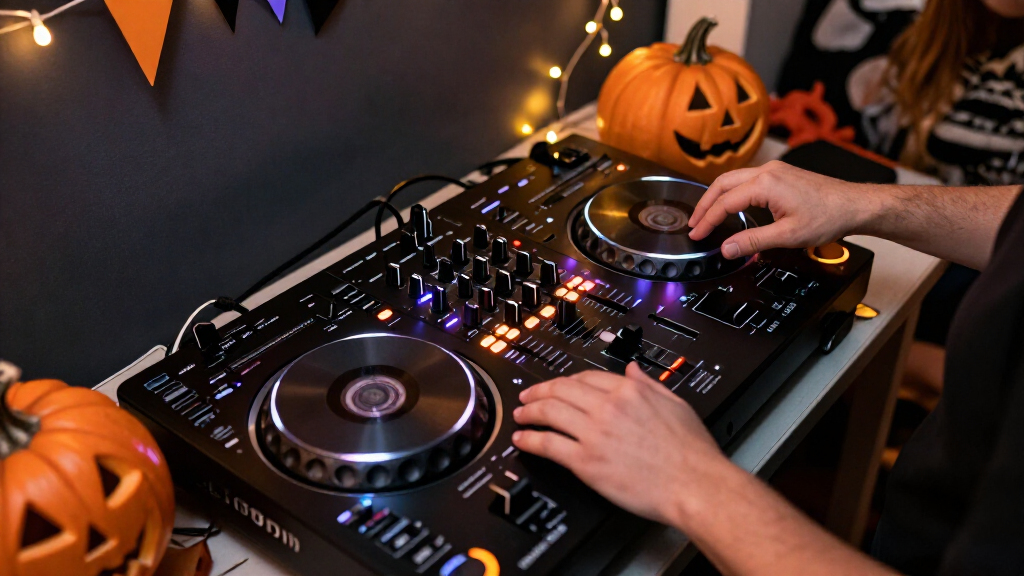
How We Picked
I ranked these controllers around the jobs a Halloween party host actually needs them to do, not around a generic feature count. First, I looked at how readily each can create party atmosphere: Party Mix III has beat-synchronized lights built in, Starlight offers seven lighting modes, and Mixstream Pro+ can control compatible DJ lighting wirelessly. Those approaches are not interchangeable. Built-in lights are immediate and self-contained; lighting modes add a little customization; wireless control suits a more deliberate setup with compatible fixtures.
Next, I weighed setup demands and music playback. A beginner-friendly, computer-connected controller can suit a living-room party, but it depends on an appropriate device and DJ software. Mixstream Pro+ can run without a computer, which can simplify booth arrangements and keep a laptop out of the way, but standalone play and stem preparation still require planning. I also compared the specified outputs because a controller that connects easily to headphones may not connect as cleanly to the venue’s main PA.
Finally, I separated the picks by party scale and likely user. Portability and approachable controls count heavily for hosts who are learning; balanced outputs and independent operation matter more for a bigger event. I used the supplied product details and specifications to make those comparisons, rather than implying hands-on testing. Every option has a compromise: these range from limited software choices and small-format outputs to computer dependence or corded power.
| DJ controllers for Halloween partie | Connectivity | Lighting |
|---|---|---|
| Numark Party Mix III Bluetooth | Bluetooth MIDI, USB-C | Beat-synchronized built-in LED light show |
| Hercules DJControl Starlight D | USB | Seven customizable modes |
| Numark Mixstream Pro+ Standalo | Wi-Fi, Bluetooth audio input, USB, SD card | — |
Factors to Consider When Choosing DJ Controllers For Halloween Parties
I’d choose a Halloween DJ controller by matching the music workflow and connections to the room before putting much weight on extra features. A home party may need little more than an accessible controller, headphones, and a reliable speaker connection; a larger event needs a more capable path to the PA. These three options split cleanly across those needs.
Match the controller to the party size
For a small gathering, Party Mix III’s built-in light show can add atmosphere without asking you to source and set up separate fixtures. Its portable size also suits a temporary table or living-room DJ area. Starlight is even lighter and more compact, but it is primarily a learning controller with lighting modes rather than the more immediately music-reactive light show of Party Mix III.
For a larger party, I’d give more weight to reliable connections and independent playback. Mixstream Pro+ has balanced XLR main outputs, a microphone input, and standalone operation, which make it better suited to a PA-based event. Its built-in speakers are useful for practice or near-field listening, but they should not be treated as a replacement for a suitable sound system when the room is large or crowded.
Choose a workflow you can prepare
Party Mix III and DJControl Starlight require DJ software or an app, so check that your laptop, tablet, or phone is compatible with the software you plan to use. Party Mix III supports Serato DJ Lite and Algoriddim djay; Starlight is designed around Serato DJ Lite. A controller’s controls are only useful if the device and software are ready, so install or update the software, organize tracks, and confirm the audio route before the party.
Mixstream Pro+ takes a different route: it can operate without a computer and offers Wi-Fi streaming plus USB and SD card support. That can make the booth simpler during the event, but it does not remove preparation. Streaming calls for network access and service compatibility, and standalone stems need tracks prepared in Engine DJ Desktop; stem playback also requires a one-time software license purchase. If you want to rely on those features, prepare them in advance and keep another music source ready.
Check outputs against your speakers
Before choosing, identify the input connections on the speaker or PA you’ll use. Party Mix III provides RCA main output, while Starlight lists a 1/8-inch stereo speaker output. Those can work for smaller setups, though adapters or additional audio equipment may be needed depending on the speakers. The Starlight also has a separate 1/8-inch headphone output for cueing.
Mixstream Pro+ stands out for a bigger sound system because it has balanced XLR main output as well as RCA. It also offers both 1/4-inch and 1/8-inch headphone outputs, plus a 1/4-inch microphone input. These connections do not automatically make it the right controller for every event, but they make it the most adaptable of the three for a PA, monitoring, and host announcements.
Decide how much lighting you need
A Halloween party can benefit from lights, but each controller handles them differently. Party Mix III includes beat-synchronized LEDs, so its lights are an easy way to add movement to a simple setup. Starlight has seven customizable modes that provide some choice over its lighting, but its main appeal is compact learning rather than a full lighting-control workflow.
Mixstream Pro+ supports wireless DJ lighting control, which makes sense if you have compatible fixtures and want to build a more involved system. It is not the same as receiving an all-in-one, beat-synced light show from the controller itself. I’d pick the lighting approach based on what you already own: integrated lights for convenience, modes for a small desktop setup, or compatible external fixtures for a larger event.
Buy for the DJ’s experience level
New DJs should prioritize understandable controls and a workflow they can rehearse. Party Mix III offers a useful balance of approachable transitions, pads, and lighting, making it my general recommendation for a first Halloween party. Starlight is more compact and focused on learning basic mixing, but its Serato DJ Lite emphasis and simpler setup narrow its flexibility.
Mixstream Pro+ is not automatically the better choice just because it has more features. Standalone play, streaming, lighting control, and prepared stems can help a host who wants a more independent booth, but they add setup decisions. Choose it if you are comfortable preparing music sources and connecting event audio. If your goal is simply to mix a short spooky playlist from a laptop, the smaller Numark or Hercules is the more direct fit.
Plan for a backup and a sound check
Halloween playlists often depend on specific edits, clean versions, cues, or transitions. I’d make a playlist that suits the crowd, confirm that every track is available in the chosen software or playback source, and test headphones and speakers before guests arrive. For controllers using a computer or mobile device, check charging and cables as well as the software. For Mixstream Pro+, check the power outlet and network if streaming is part of the plan.
Keep a backup playback option available, especially if the party depends on a Wi-Fi stream or a single laptop. Test the actual cable path to the room’s speaker system rather than relying on connector names alone. A short sound check can reveal whether an adapter, longer cable, or different output is needed while there is still time to fix it.
Frequently Asked Questions
Which controller is my best all-around choice for a Halloween party?
I’d choose the Numark Party Mix III for most small or medium home parties. Its beat-synchronized lights add atmosphere without separate lighting equipment, and its beginner-friendly controls, performance pads, and Stems controls leave room to make creative transitions. It still needs compatible DJ software or an app, and its RCA main output is less suited to some large PA setups than the Mixstream Pro+’s balanced XLR.
Which of these controllers can play without a laptop?
The Numark Mixstream Pro+ is the standalone option in this group. It supports Wi-Fi streaming, USB, and SD card playback through its touchscreen workflow, so a computer does not need to remain in the booth during the party. Party Mix III and DJControl Starlight are designed to work with compatible DJ software or an app. For Mixstream Pro+, check your music source and network plan ahead of time, and prepare tracks in Engine DJ Desktop if you intend to use standalone stems.
Which controller has the most useful built-in lighting for a simple setup?
Party Mix III has the clearest built-in lighting advantage for a host who wants an immediate visual effect: its LEDs are beat-synchronized. DJControl Starlight offers seven lighting modes, which provide some customization in a very compact controller, while Mixstream Pro+ is built to control compatible external DJ lighting wirelessly. The right choice depends on whether you want an integrated effect, a compact controller with lighting modes, or control over separate fixtures.
What should I connect to a PA system?
For a larger PA setup, I’d look first at the Mixstream Pro+ because it has balanced XLR main output as well as RCA. Party Mix III has RCA main output, and DJControl Starlight specifies a 1/8-inch stereo speaker output, so either may require an adapter or an additional audio connection depending on the equipment. Check the PA’s actual inputs and do a sound check before guests arrive; a suitable cable path matters as much as the controller’s listed outputs.
Do I need to prepare music or stems before the party?
Yes. With Party Mix III and Starlight, install and check the compatible DJ software or app, organize your playlist, and test audio output before the event. With Mixstream Pro+, verify the streaming service and network if you plan to stream, or prepare local media for playback. Its standalone stem playback requires tracks prepared with Engine DJ Desktop, and stem functionality requires a one-time software license purchase, so do not leave that setup until party time.
Conclusion
For most hosts and first-time DJs, I recommend Numark Party Mix III: it combines approachable two-deck controls with beat-synchronized lights that suit the Halloween theme, while remaining portable and USB-powered. Pick the Hercules DJControl Starlight if your priority is a small, lightweight controller for learning Serato DJ Lite and you can accept simpler outputs and less immediate lighting impact. Choose the Numark Mixstream Pro+ for a larger party where laptop-free operation, Wi-Fi streaming, a microphone input, and balanced XLR PA output matter more than compactness or quick setup. Before deciding, match the controller’s outputs to your speakers and leave time to prepare your tracks and test the full setup.
Halloween Picks
halloween
As an affiliate, we earn on qualifying purchases.