TL;DR
A wireless microphone for creators uses a transmitter near the speaker and a receiver connected to a camera, phone, or computer, giving you room to move while recording speech. Choose by checking device compatibility, speaker count, monitoring, battery life, and backup recording, then test the setup where you plan to shoot; mic placement and wind protection often matter more than price.
A wireless mic uses a transmitter near the speaker and a receiver connected to your recording device; some transmitters also store local audio.
Check the exact phone, camera, or computer connection before buying; a matching plug does not guarantee compatibility.
Mic placement near your mouth often improves speech clarity more than spending extra on a mic that sits far away.
For two speakers, confirm that the kit supports two transmitters and whether it records separate tracks.
Test distance, clothing noise, wind protection, and playback at the real location before an important shoot.

Get audio and creator gear delivered free with Prime
- Fast, free delivery on millions of items
- Prime Video, Amazon Music and more included
- Member-only deals all year
How a wireless mic keeps your voice close while you move
A wireless microphone for creators sends sound from a transmitter worn by or placed near the speaker to a receiver connected to your recording device. That radio link lets creators record clear speech without being tethered to a camera, which helps when you’re walking through a tutorial, filming an interview, or moving around a kitchen. Think of the transmitter and receiver like a tiny two-way bridge: your voice crosses it, but obstacles and interference can make the path unreliable. Some transmitters also save a local copy of the audio, giving you another file if the wireless link cuts out. For example, if you’re demonstrating a recipe, a transmitter clipped near your collar keeps your voice present while you reach for a sizzling pan. A camera mic across the counter may pick up the pan more clearly than your instructions.Products Worth Considering

Apple iPad 11-inch (A16), 128GB, Wi-Fi, Silver
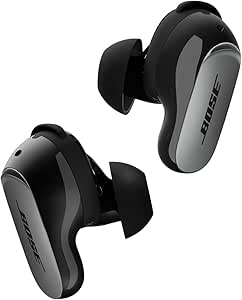
Bose QuietComfort Ultra Earbuds (2nd Gen), Wireless Noise-Cancelling Earbuds with Immersive Audio and Wireless Charging Case, Black

DJI Osmo Mobile 8 Phone Gimbal with Mic Mini Transmitter, Infinity Black
As an affiliate, we earn on qualifying purchases.
When wireless freedom helps—and when a cable is easier
A wireless mic helps when movement, distance, or visible cables would get in your shot; a wired mic can be simpler when you stay at a desk. Choose for how you record, not just for the promise of freedom: wireless adds a radio link, batteries, and setup checks, while a stationary creator may prefer a direct USB or XLR connection.| Your situation | What fits | Why it helps |
|---|---|---|
| Walking video or location shoot | Wireless transmitter and receiver | You can move without dragging a cable through the frame. |
| Desk video or voice recording | Wired USB or XLR mic | A direct connection avoids radio-link and transmitter battery concerns. |
| Interview or co-hosted video | Two-transmitter wireless kit | Each person can wear a mic; separate tracks make editing easier. |
What to check before buying your first kit
To choose a wireless microphone for creators, check the device connection, speaker count, backup and monitoring features, and full kit cost before placing an order. Work through these five checks with the camera or phone you actually use:- Match the connection. Check whether your device needs a 3.5 mm cable, USB-C, Lightning, or a camera accessory shoe. A plug that fits may still need an adapter or a phone setting.
- Count the speakers. Solo videos usually need one transmitter. For two speakers, check that the kit supports two transmitters and find out whether it records each voice separately.
- Check monitoring and controls. Headphone monitoring, level meters, mute buttons, and adjustable gain help you catch trouble before you finish a take.
- Plan for batteries and backup. Compare operating time and charging options. Onboard transmitter recording can save a take after a link drop, but you’ll need to start recording and sync the file later.
- Add the accessories. Price in spare windscreens, device cables, adapters, and a case. The advertised kit may not include what your shoot needs.
Why mic placement beats an impressive price tag
A wireless microphone for creators sounds clearer when you place it close to the speaker, because the mic captures more direct voice and less of the room. Distance matters: a clip-on near your mouth can make speech easier to understand than a camera-mounted mic several feet away, even when the camera mic costs more. Imagine you record in a tiled kitchen. Your voice bounces off the hard walls, while the refrigerator hums in the background; moving the mic closer can make your words stand out, but it won’t erase the hum or fix a noisy room. Listen for natural voice tone, low hiss, and rubbing sounds from fabric. A hidden lavalier can look neat on camera, yet its capsule may scrape against a shirt as you turn your head. Test the clip and clothing before the real take, and leave the transmitter controls accessible if you need to mute or adjust levels.How to test range, wind, and signal before a shoot
A wireless microphone for creators needs a short sound check in the actual recording space, because a best-case range figure can’t predict every wall, crowd, Wi-Fi device, or radio source. Keep the transmitter and receiver in a clear path where possible, and monitor the sound before you record anything you can’t repeat.| Test | What to do | What it can catch |
|---|---|---|
| Distance | Walk the route you’ll film while speaking at a normal volume. | Dropouts caused by range or obstacles. |
| Clothing | Turn, bend, and move in the outfit you’ll wear. | Fabric scrape and loose clips. |
| Outdoor wind | Fit a furry windscreen and listen from a test clip. | Wind rumble that overwhelms speech. |
| Recording path | Play back the device recording and any local backup. | Wrong input, missing track, or sync problems. |