
TL;DR
The Philips Hue Play HDMI Sync Box 4K (2026) offers Hue screen-synced lighting for less than half the launch price of the 8K flagship, according to the review. It supports 4K at 60Hz but has one HDMI input, lacks HDMI 2.1 and 4K at 120Hz, and needs a Hue Bridge to coordinate multiple lights.
A review of Signify’s Philips Hue Play HDMI Sync Box 4K (2026) finds it delivers screen-matched Hue lighting at less than half the launch price of the 8K flagship, while giving up features useful to some gaming and multi-device setups. The reviewer says the box supports 4K at 60Hz, but has just one HDMI input and does not support HDMI 2.1 or 4K at 120Hz.

Get audio and creator gear delivered free with Prime
- Fast, free delivery on millions of items
- Prime Video, Amazon Music and more included
- Member-only deals all year
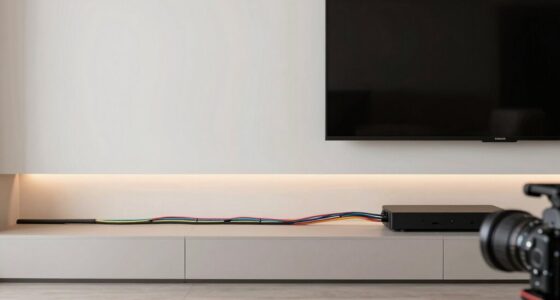
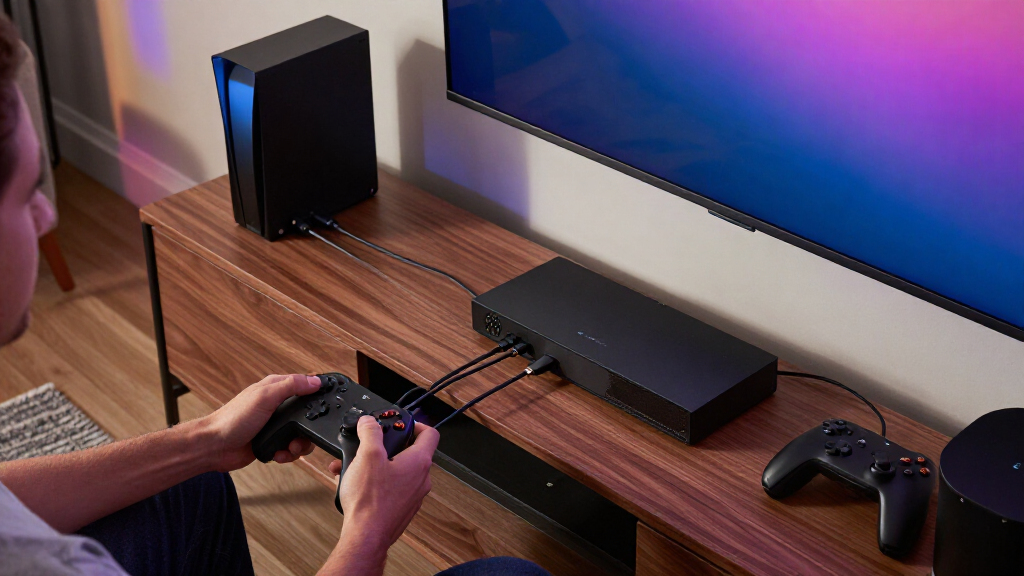
The device sits between an HDMI video source and a television, reads the signal and sends color information to compatible Hue lights. Unlike camera-based TV lighting systems, it does not need a camera pointed at the screen. The reviewer describes its setup as straightforward and reports testing it with an Apple TV and Xbox Series X on an 85-inch Samsung television.
According to the product specifications cited in the review, video support includes HDMI 2.0, 4K at 60Hz and 1440p at 120Hz. The compact unit measures 117 by 87 by 23 millimeters and includes a USB-C power adapter and HDMI cable. The review says it can work with one Bluetooth light without a Bridge, but a Hue Bridge is needed to use multiple lights together.
The review’s main hardware caveat is the single HDMI input. It notes that earlier Sync Box models, including the 8K flagship, have four, so users with several sources may need to swap cables or add a separate HDMI switcher. The reviewer’s verdict is that the new model is a good fit for existing Hue owners prioritizing movie and TV lighting over advanced gaming specifications or built-in source switching.
Philips Hue Play HDMI Sync Box 4K Who is it for?
The 2026 model brings screen-matched Hue lighting at less than half the 8K flagship’s launch price, with limits that matter for gaming and multi-device setups.
What it does well
It reads the HDMI signal and sends color information to compatible Hue lights, without a camera pointed at the screen.
Screen-matched lighting
A good fit for Hue owners who want immersive lighting for streaming and movies.
Straightforward start
The reviewer reports an easy setup, tested with Apple TV and Xbox Series X.
Where the savings come with trade-offs
The lower-cost model leaves out features that can matter for gaming or several connected sources.
- One HDMI source
- Movies and streaming at 4K and 60Hz
- Existing Hue lights
- Several HDMI sources need swapping or a separate switcher
- No HDMI 2.1 or 4K at 120Hz
- A Bridge is needed to coordinate multiple lights
Choose the lighting approach
The two Hue systems cover different viewing sources.
| System | How it syncs | Source coverage |
|---|---|---|
| HDMI Sync Box 4K | Reads HDMI signal; no camera | Connected HDMI sources |
| Hue Play Screen Sync | Uses a camera | Can work with smart-TV apps and broadcast channels |
Before buying
The supplied review does not give the new model’s exact price or local availability.
Decide whether one HDMI input is enough for your setup.
Confirm whether 4K at 120Hz is important for your console and display.
Factor in compatible lights and a Bridge for multiple lights; confirm local pricing and what any bundle includes.
The Price Comes With Trade-Offs
The lower price broadens access to Hue’s screen-synced lighting, particularly for people who already own compatible lights and do not need a high-end gaming signal. For streaming and movie viewing at 4K and 60Hz, the review says the box’s video support may be sufficient, while its lighting effects remain the central attraction.
But the savings matter less to households that regularly switch among several HDMI devices or want 4K gaming at 120Hz. The one-input design can add cable swapping or require another piece of equipment. Buyers should also account for the cost of Hue lights and, for a multi-light setup, a Bridge; the box alone does not create a complete lighting system.
The review also describes a choice between two approaches to TV lighting. HDMI sync reads the source signal without a camera, but does not cover every source automatically. Signify’s separately introduced Hue Play Screen Sync uses a camera and can work with native smart-TV apps and broadcast channels, according to the supplied product information.
Products Worth Considering

DJI Osmo Mobile 8 Phone Gimbal with Mic Mini Transmitter, Infinity Black

Samsung Galaxy Tab A11 8.7-Inch Wi-Fi Tablet, 64GB, 4GB RAM, 90Hz, Gray, with 20W Charger

Logitech MX Master 4 Ergonomic Wireless Mouse with Haptic Feedback, Graphite
As an affiliate, we earn on qualifying purchases.
A Lower-Cost Hue Sync Option
According to the supplied product history, Signify’s Hue HDMI Sync Box line dates to 2019. The original model supported 4K at 60Hz; the 2024 flagship added HDMI 2.1, 4K at 120Hz and support for resolutions up to 8K. The source says that flagship launched at around $350, putting it at a much higher price point than the new 4K model. The exact current retail prices are not provided.
The new box is positioned around accessible screen-synced lighting rather than matching the flagship’s specifications. The reviewer notes that 8K televisions remain uncommon, while 4K at 120Hz is a practical feature for people with compatible gaming consoles and displays. The review also names Govee and AiDot as alternatives in the TV-lighting market, while pointing to Hue’s established smart-lighting ecosystem as a reason existing customers might choose this device.
For the review setup, the tester used a Hue Gradient Lightstrip behind the television and a Gradient Light Tube on the AV unit. The supplied product information says the system can also use Hue white and color ambiance bulbs and fixtures; the dedicated Play range is not the only compatible option.
Price and Setup Details to Check
The supplied review material does not give the new box’s exact price, a complete list of markets or availability dates, or measured comparisons of lighting response against the 8K model. It says the new unit costs less than half the flagship’s launch price, but does not provide a precise price comparison or establish whether that ratio applies to current retail prices.
The review also does not specify how the unit handles every HDMI source, audio format or copy-protection configuration, nor does it provide test results for latency or long-term reliability. Its hands-on testing covers an Apple TV and Xbox Series X, but that does not establish compatibility with every television or device combination. The reviewer’s positive assessment of the effects is an evaluation, not a quantified performance measure.
Readers should check the final product specifications and local pricing before buying, especially if they need multiple connected sources, a Bridge, or lighting components. The supplied material does not state whether a Bridge is included in any bundle.
Check Your Sources Before Buying
The next practical step for prospective buyers is to compare the box’s confirmed specifications with their own setup: count the HDMI sources they want routed through it, check whether 4K at 120Hz is required, and confirm which Hue lights and Bridge they already own. One HDMI source and 4K at 60Hz are the central limits to weigh against the lower price.
Signify’s IFA introduction also included the camera-based Hue Play Screen Sync, but the supplied material gives no launch schedule or pricing for that system. Future hands-on testing and retailer listings may clarify those details, as well as the Sync Box 4K’s local price and availability. Until then, the review supports a conditional conclusion: it is aimed at Hue owners seeking living-room lighting effects, not buyers looking for a full-featured HDMI switch or top-end gaming support.
Key Questions
What video formats does the Hue Play HDMI Sync Box 4K support?
The product specifications cited in the review list HDMI 2.0, 4K at 60Hz and 1440p at 120Hz. The device does not support HDMI 2.1 or 4K at 120Hz.
How many HDMI devices can be connected at once?
The review says the 2026 model has one HDMI input. It notes that users with multiple sources may need to change cables or use a separate HDMI switcher.
Do I need a Hue Bridge?
According to the supplied product information, the box can work with one Bluetooth light without a Bridge. A Hue Bridge is needed to use multiple lights together.
Does it use a camera to match the lights to the TV?
No. The review says the Sync Box reads the incoming HDMI signal and sends color information to compatible lights. Signify also introduced a separate camera-based Hue Play Screen Sync system that can work with native TV apps and broadcast channels, according to the supplied material.
Who is the 2026 Sync Box best suited to?
The reviewer recommends it for existing Hue owners who want screen-matched lighting for movies and streaming without paying flagship prices. Its single input and lack of 4K at 120Hz may make it a poor fit for people with several sources or compatible high-refresh-rate gaming equipment.
Source: the-ambient.com