For most new podcasters, I’d start with the FIFINE AmpliGame AM8 USB/XLR Dynamic Microphone: its two connection options make it easier to begin with USB and expand to an audio interface later. The Zoom ZUM-2 Podcast Mic Pack is a strong pick if you want headphones and a tripod included, while the FIFINE K669PRO1 keeps desktop recording simple with USB, gain control, and a mute button. The main tradeoff is between easy USB setup and the added flexibility of XLR, alongside condenser sensitivity versus dynamic microphones’ closer-talking focus. Stand and accessory needs matter too, since a low-cost microphone can require extra gear to fit your recording space. Read on for the full breakdown and a pick matched to your setup.

Get audio and creator gear delivered free with Prime
- Fast, free delivery on millions of items
- Prime Video, Amazon Music and more included
- Member-only deals all year
Complete the kit


Key Takeaways
- USB/XLR flexibility sets several leading picks apart: the AM8, AM8T, TANK6S, TD510 Air, HD300T, and K688S can suit a simple computer setup now and an interface-based setup later.
- The Zoom ZUM-2 pack is the clearest all-in-one starter proposition: its included headphones and tripod reduce the number of separate recording essentials to source.
- Condenser models favor a different room and workflow: the K669PRO1, T669, A04, K66, TC-777, and renewed Blue Yeti offer USB-focused setups, but their sensitivity can make room noise more noticeable.
- Included hardware changes the real value: the T669 bundles an adjustable boom arm, while the TD510 Air and several dynamic models may suit buyers who already have or plan to add their preferred mounting gear.
- Some picks solve niche problems rather than general podcasting: the Mini Mic Pro targets mobile wireless recording, and the PD200W adds a hybrid wireless route that desktop-only buyers may not need.
| FIFINE K669PRO1 USB Condenser Microphone with Mute Button and Gain Control |  | Best Simple Desktop Pick | Microphone type: USB condenser | Polar pattern: Unidirectional (cardioid) | Frequency response: 80 Hz–20 kHz | VIEW LATEST PRICE | See Our Full Breakdown |
| FIFINE AmpliGame AM8T Dynamic USB/XLR Microphone Kit with Boom Arm |  | Best Starter Kit with Upgrade Path | Microphone type: Dynamic | Connectivity: USB and XLR | Polar pattern: Unidirectional (cardioid) | VIEW LATEST PRICE | See Our Full Breakdown |
| Zoom ZUM-2 Podcast Mic Pack with USB Microphone, Headphones, and Tripod |  | Best Complete Beginner Bundle | Microphone type: USB condenser | Polar pattern: Supercardioid | Connectivity: USB | VIEW LATEST PRICE | See Our Full Breakdown |
| FIFINE AmpliTank TANK6S Dynamic XLR/USB Desktop Microphone |  | Best Desktop Dynamic with Monitoring | Microphone type: Dynamic | Connectivity: USB and XLR | Polar pattern: Unidirectional | VIEW LATEST PRICE | See Our Full Breakdown |
| Mini Mic Pro Wireless Lavalier Microphone for iPhone and Android | 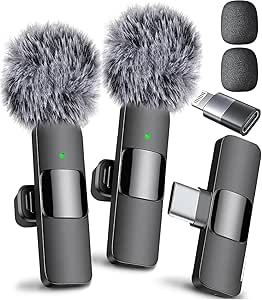 | Best for Mobile and On-the-Go Recording | Microphone type: Mini lavalier | Connectivity: Wireless | Connectors: Lightning and USB Type-C | VIEW LATEST PRICE | See Our Full Breakdown |
| FIFINE T669 USB Condenser Microphone Kit with Adjustable Boom Arm |  | Best Complete Boom-Arm Kit | Microphone type: Condenser | Connectivity: USB | Polar pattern: Cardioid | VIEW LATEST PRICE | See Our Full Breakdown |
| ZealSound K66 USB Condenser Microphone with Noise Reduction, Gain and Volume Controls, Mute, Monitoring, and Echo |  | Best for On-Mic Controls | Microphone type: Condenser | Pickup pattern: Cardioid | Frequency response: 40 Hz–18 kHz | VIEW LATEST PRICE | See Our Full Breakdown |
| TONOR TD510 Air Dynamic Podcast Microphone with USB/XLR Connectivity |  | Best Dynamic Mic for Roomier Spaces | Microphone type: Dynamic | Polar pattern: Cardioid | Connectivity: USB and XLR | VIEW LATEST PRICE | See Our Full Breakdown |
| MAONO HD300T USB/XLR Dynamic Podcast Microphone |  | Best Value Dynamic Starter Bundle | Microphone type: Dynamic | Connectivity: USB and XLR | Pickup pattern: Super cardioid (listed specs also describe cardioid pickup) | VIEW LATEST PRICE | See Our Full Breakdown |
| MAONO A04 USB Condenser Microphone Kit |  | Best for High-Resolution USB Recording | Microphone type: Large-diaphragm condenser | Connectivity: USB, USB Type-C | Polar pattern: Cardioid | VIEW LATEST PRICE | See Our Full Breakdown |
| FIFINE AmpliGame AM8 USB/XLR Dynamic Microphone |  | Best for USB-to-XLR Upgrades | Microphone type: Dynamic | Connectivity: USB, XLR | Polar pattern: Cardioid | VIEW LATEST PRICE | See Our Full Breakdown |
| MAONO PD200W Hybrid Wireless Podcast Microphone |  | Best for Wireless Two-Person Recording | Microphone type: Dynamic | Connectivity: Wireless, USB, XLR | Connector types: USB Type-C, XLR | VIEW LATEST PRICE | See Our Full Breakdown |
| Blue Yeti USB Microphone, Blackout Edition (Renewed) |  | Best for Multiple Pickup Patterns | Condition: Renewed | Connectivity: USB | Pickup patterns: Bidirectional, omnidirectional, unidirectional | VIEW LATEST PRICE | See Our Full Breakdown |
| TONOR TC-777 USB Condenser Microphone with Tripod Stand and Pop Filter | 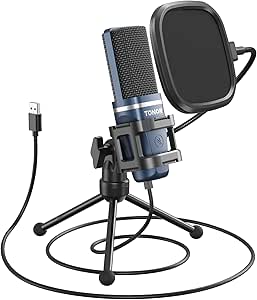 | Best Simple Starter Bundle | Microphone type: Condenser | Connectivity: USB 2.0, USB Type-A | Pickup pattern: Cardioid | VIEW LATEST PRICE | See Our Full Breakdown |
| FIFINE K688S XLR/USB Dynamic Podcast Microphone with Desktop Stand |  | Best All-in-One Dynamic Desk Setup | Microphone type: Dynamic | Connectivity: USB Type-C, XLR | Polar pattern: Cardioid | VIEW LATEST PRICE | See Our Full Breakdown |
| budget podcast microphone | Connectivity | Microphone type | Polar pattern | Signal-to-noise ratio |
|---|---|---|---|---|
| FIFINE K669PRO1 USB Condenser | USB | USB condenser | Unidirectional (cardioid) | 70 dB |
| FIFINE AmpliGame AM8T Dynamic | USB and XLR | Dynamic | Unidirectional (cardioid) | 80 dB |
| Zoom ZUM-2 Podcast Mic Pack wi | USB | USB condenser | Supercardioid | 78 dB |
| FIFINE AmpliTank TANK6S Dynami | USB and XLR | Dynamic | Unidirectional | 70 dB |
| Mini Mic Pro Wireless Lavalier | Wireless | Mini lavalier | Omnidirectional | — |
| FIFINE T669 USB Condenser Micr | USB | Condenser | Cardioid | 78 dB |
| ZealSound K66 USB Condenser Mi | USB; USB-C and Lightning adapters included | Condenser | — | — |
| TONOR TD510 Air Dynamic Podcas | USB and XLR | Dynamic | Cardioid | — |
| MAONO HD300T USB/XLR Dynamic P | USB and XLR | Dynamic | — | 80 dB |
| MAONO A04 USB Condenser Microp | USB, USB Type-C | Large-diaphragm condenser | Cardioid | — |
| FIFINE AmpliGame AM8 USB/XLR D | USB, XLR | Dynamic | Cardioid | 80 dB |
| MAONO PD200W Hybrid Wireless P | Wireless, USB, XLR | Dynamic | Cardioid | — |
| Blue Yeti USB Microphone | USB | — | — | 70 dB |
| TONOR TC-777 USB Condenser Mic | USB 2.0, USB Type-A | Condenser | — | 80 dB |
| FIFINE K688S XLR/USB Dynamic P | USB Type-C, XLR | Dynamic | Cardioid | 80 dB |
More Details on Our Top Picks
FIFINE K669PRO1 USB Condenser Microphone with Mute Button and Gain Control
The FIFINE K669PRO1 is a straightforward choice for a first podcast setup: connect it to a computer over USB, set its gain on the mic, and record. Its cardioid pickup pattern favors sound from in front, which can help keep some surrounding noise out of a solo voice recording. The mute button is handy for calls or live sessions, while the included tripod keeps the setup compact and uncomplicated.
Compared with the Zoom ZUM-2 Podcast Mic Pack, this FIFINE offers convenient onboard gain control but does not include headphones or a windscreen. Its condenser design and desktop stand also make microphone placement more exposed to room sound than the dynamic FIFINE AmpliGame AM8T. I would choose it for a quiet room and a minimal USB workflow; skip it if you need XLR expansion, a boom arm, or a complete recording kit.
Pros:- USB connection supports a simple computer-based setup.
- On-mic mute button and gain knob provide quick control while recording.
- Cardioid pattern focuses pickup toward the speaker.
- Includes a tripod stand and USB-to-USB-C cable.
Cons:- Condenser design may capture more room sound than the dynamic AM8T.
- Single-channel mono recording does not suit stereo capture.
- Tripod placement offers less positioning flexibility than a boom arm.
Best for: Solo podcasters recording at a desk in a relatively quiet room who want direct USB setup and simple mute and gain controls.
Not ideal for: Speakers in noisy or echo-prone rooms, or buyers who need XLR connectivity, included headphones, or a boom arm.
- Microphone type:USB condenser
- Polar pattern:Unidirectional (cardioid)
- Frequency response:80 Hz–20 kHz
- Diaphragm size:16 mm
- Signal-to-noise ratio:70 dB
- Controls:Mute button and gain knob
- Connectivity:USB
- Included items:Tripod stand, USB-to-USB-C cable, user manual
Our verdict“Choose the K669PRO1 for a compact, control-friendly USB setup in a quiet room; pick a dynamic or XLR-capable option if your space or recording plans demand more flexibility.”
FIFINE AmpliGame AM8T Dynamic USB/XLR Microphone Kit with Boom Arm
The FIFINE AmpliGame AM8T makes a strong case for buyers who want a microphone and desk positioning gear in one package. Its dynamic cardioid design is a sensible fit for close-miked speech, while USB gets a beginner recording quickly and XLR leaves a path to a mixer or interface later. The included boom arm, mute and gain controls, and headphone monitoring reduce the need to add basic accessories right away.
Compared with the FIFINE K669PRO1, the AM8T brings more setup flexibility and an XLR option, but it takes up more desk space and depends on a clamp that fits desks no thicker than two inches. Unlike the FIFINE AmpliTank TANK6S, it includes a boom arm rather than a desktop stand. The tradeoff is that an XLR cable is not supplied, and its RGB lighting may not suit a restrained recording setup.
Pros:- USB and XLR connections support both direct computer use and later mixer or interface setups.
- Boom arm and desk clamp provide adjustable mic placement.
- Onboard mute, gain, and headphone monitoring controls support hands-on recording.
- Dynamic cardioid pickup is suited to close speech recording.
Cons:- XLR cable is not included, adding a separate item for XLR use.
- Desk clamp fits surfaces up to two inches thick.
- Boom arm and RGB features add bulk compared with the K669PRO1’s compact tripod setup.
Best for: New podcasters who want a close-positioned dynamic mic, included boom arm, and the option to move from USB to XLR later.
Not ideal for: Buyers with desks thicker than two inches, minimal desk space, or a preference for a simple desktop stand and no lighting effects.
- Microphone type:Dynamic
- Connectivity:USB and XLR
- Polar pattern:Unidirectional (cardioid)
- Frequency range:50 Hz–16 kHz
- Signal-to-noise ratio:80 dB
- Controls and monitoring:Mute, gain, headphone jack, headphone volume control
- Included accessories:Boom arm, C-clamp, windscreen, 8.2 ft USB-to-USB-C cable
- Desk clamp fit:Desktop thickness up to 2 inches
Our verdict“Pick the AM8T if you want a dynamic USB mic with a boom arm now and XLR flexibility later, provided its clamp fits your desk.”
Zoom ZUM-2 Podcast Mic Pack with USB Microphone, Headphones, and Tripod
The Zoom ZUM-2 Podcast Mic Pack is the easiest pick here for someone starting without recording accessories. It bundles a USB condenser microphone with closed-back headphones, a tabletop tripod, a foam windscreen, and a cable, so a beginner can monitor a session without assembling a separate kit. Its supercardioid pattern is designed to favor sound from the front and reject more off-axis sound than the K669PRO1’s cardioid pattern, which can help when the mic is aimed carefully.
Compared with the FIFINE AmpliGame AM8T, the Zoom prioritizes a ready-to-use set of essentials over boom-arm positioning and XLR expansion. It connects to a computer by USB and is limited to single-channel recording, so it is less suited to someone building a more expandable studio. The included cable is two meters long, which may constrain placement if the computer is farther away.
Pros:- Includes headphones, tripod, foam windscreen, and USB cable alongside the microphone.
- Supercardioid pickup is designed to reduce off-axis sound when aimed carefully.
- Plug-and-play USB connection works with PC and Mac without additional drivers.
- Closed-back headphones help isolate the recording while monitoring.
Cons:- USB-only connectivity offers less expansion than the AM8T’s USB/XLR setup.
- Single-channel recording does not provide stereo capture.
- The included USB cable is 2 m long.
Best for: First-time podcasters who need a USB mic, monitoring headphones, and basic recording accessories in one package.
Not ideal for: Creators who want XLR connectivity, a boom arm, or a longer cable for positioning the microphone away from the computer.
- Microphone type:USB condenser
- Polar pattern:Supercardioid
- Connectivity:USB
- Signal-to-noise ratio:78 dB
- Headphone driver:40 mm neodymium
- Headphone impedance:68 ohms
- Included components:Microphone, closed-back headphones, tabletop tripod, foam windscreen, USB-C cable
- USB cable length:2 m USB-C to USB-A
Our verdict“Choose the ZUM-2 pack if you want the key accessories for a first podcast setup in one box and do not need XLR expansion.”
FIFINE AmpliTank TANK6S Dynamic XLR/USB Desktop Microphone
The FIFINE AmpliTank TANK6S suits podcasters who want a dynamic mic to sit directly on the desk, with both USB convenience and XLR connectivity available. Its zero-latency headphone monitoring and onboard mute, gain, and headphone-volume controls make it easier to manage a recording without reaching for software controls. The height-adjustable metal stand and heavy base favor a stable desktop arrangement over the more flexible boom-arm approach of the FIFINE AmpliGame AM8T.
The TANK6S is best kept close: the product guidance calls for positioning it two to six inches from the source. That close-working style may not suit guests who move around or want the mic out of view. Its listed frequency response is simply given as 18 kHz, without a lower endpoint, so the published detail is less complete than the AM8T’s stated range. The XLR cable is also not listed among included accessories.
Pros:- USB and XLR connectivity cover direct computer use and interface-based setups.
- Zero-latency monitoring and onboard controls support live recording adjustments.
- Height-adjustable metal stand and heavy base provide a stable desktop setup.
- Multi-layer noise-reduction structure is designed to limit unwanted background sound.
Cons:- Recommended two-to-six-inch placement requires close, consistent mic technique.
- Listed frequency response is incomplete, with only an 18 kHz figure provided.
- The included accessories do not list an XLR cable.
Best for: Desk-based solo podcasters who want a dynamic USB/XLR microphone, onboard monitoring, and a sturdy adjustable stand.
Not ideal for: Hosts who need a boom arm, frequently change speaking distance, or want a clearly specified full frequency-response range.
- Microphone type:Dynamic
- Connectivity:USB and XLR
- Polar pattern:Unidirectional
- Impedance:300 ohm
- Signal-to-noise ratio:70 dB
- Listed frequency response:18 kHz
- Special features:Headphone monitoring, mute function, gain and headphone-volume controls
- Included accessories:Height-adjustable stand, USB-A to USB-A/C cable
Our verdict“Choose the TANK6S for a stable close-miked desktop setup with monitoring controls, but favor the AM8T if you need boom-arm positioning.”
Mini Mic Pro Wireless Lavalier Microphone for iPhone and Android
The Mini Mic Pro Wireless Lavalier serves a different kind of podcast setup from the desktop microphones here: it clips to a speaker and connects to a phone or tablet through the included Lightning or USB-C receiver. That makes it useful for interviews, walk-and-talk segments, and recording away from a desk, while the no-app, no-Bluetooth-pairing setup avoids a separate pairing step. Two microphones are included, along with foam and deadcat wind covers for handling light wind outdoors.
Compared with the Zoom ZUM-2 Podcast Mic Pack, this kit favors mobility and two lavalier mics over desktop monitoring headphones and a conventional mic stand. Its omnidirectional pickup captures sound from all directions, so it does not offer the directional room rejection of the Zoom’s supercardioid design. Battery life reaches up to six hours per charge, making it less suitable for extended recording days or a fixed studio workflow.
Pros:- Includes Lightning and USB-C adapters for compatible Apple and Android devices.
- Plug-and-play setup requires no app or Bluetooth pairing.
- Two lavalier microphones support two-speaker recordings.
- Foam and deadcat covers offer options for reducing wind interference outdoors.
Cons:- Up to six hours of battery life may not cover longer recording sessions.
- Omnidirectional pickup captures sound from around the mic rather than focusing on one direction.
- Wireless lavalier format lacks the desktop controls and monitoring features of the TANK6S.
Best for: Mobile podcasters and interviewers recording on compatible phones or tablets who want a quick wireless lavalier setup.
Not ideal for: Studio-focused hosts who need directional pickup, headphone monitoring, a desktop microphone, or recording sessions longer than its stated battery life.
- Microphone type:Mini lavalier
- Connectivity:Wireless
- Connectors:Lightning and USB Type-C
- Polar pattern:Omnidirectional
- Battery life:Up to 6 hours per charge
- Compatible devices:Android, laptop, smartphone, tablet, iPad, iPhone
- Included items:Two lavalier microphones, receiver, USB charging cable, two clips, foam tips, deadcat tips
- Dimensions:3 × 0.5 × 0.25 inches
Our verdict“Choose the Mini Mic Pro for portable phone-based interviews and field segments, not as a substitute for a monitored desktop podcast microphone.”
FIFINE T669 USB Condenser Microphone Kit with Adjustable Boom Arm
The FIFINE T669 makes a sensible choice for a first desk-based podcast setup because its USB connection and included arm, shock mount, and double-layer pop filter cover several common setup needs at once. Its cardioid pickup favors sound from the front, which can help keep some room noise from competing with a close-miked voice, though it cannot make a noisy room silent. Compared with the MAONO A04, it offers a longer stated arm reach and a broader frequency-response range, while the A04 includes a windscreen and lists a high-resolution recording chipset. The T669’s tradeoff is its condenser design: it suits a reasonably controlled space better than a room with persistent background noise. It also depends on a compatible USB device and does not work with Xbox.
Pros:- Plug-and-play USB connection for compatible computers, without extra drivers.
- Includes a steel boom arm, shock mount, and double-layer pop filter.
- Cardioid pattern favors sound arriving from the front.
- Up to 30-inch arm reach helps position the microphone close to the speaker.
Cons:- Not compatible with Xbox.
- USB operation requires a compatible computer or other supported device.
- Condenser pickup may capture more room sound than a dynamic option such as the TONOR TD510 Air.
Best for: New podcasters recording at a computer who want a microphone, adjustable boom arm, and plosive protection in one kit.
Not ideal for: Xbox users or people recording in a persistently noisy room who want a dynamic microphone rather than a condenser.
- Microphone type:Condenser
- Connectivity:USB
- Polar pattern:Cardioid
- Frequency response:20 Hz–20 kHz
- Signal-to-noise ratio:78 dB
- Cable length:8.2 ft
- Boom arm reach:30 in
- Included accessories:Steel boom arm, shock mount, double pop filter, USB-B to USB-A/C cable
Our verdict“Choose the T669 if you want a ready-to-position computer microphone kit, but skip it if Xbox support or stronger rejection of room noise is a priority.”
ZealSound K66 USB Condenser Microphone with Noise Reduction, Gain and Volume Controls, Mute, Monitoring, and Echo
The ZealSound K66 stands apart from simpler USB microphones by putting gain, headphone volume, echo, and mute controls directly on the mic. That makes it a practical fit for solo recording or streaming when you want quick adjustments without reaching for computer settings. Its headphone jack supports zero-latency monitoring, so you can hear your voice while recording, and included USB-C and Lightning adapters extend its reach to compatible phones and tablets. Compared with the FIFINE T669, the K66 offers more immediate controls and mobile connection options, but it does not come with a boom arm or the T669’s full positioning kit. Its selectable noise-reduction mode may help with fan or keyboard sounds, but it is not a substitute for a quiet room; mobile use also depends on device support.
Pros:- Physical controls for microphone gain, monitoring volume, echo, and mute.
- Zero-latency headphone monitoring through a 3.5 mm jack.
- Includes USB-C and Lightning adapters for compatible mobile devices.
- Selectable noise-reduction mode offers an extra option for managing background sounds.
Cons:- Noise reduction is not specified to eliminate background sounds.
- Mobile compatibility depends on both the adapter and device support.
- Does not include the boom-arm and accessory bundle supplied with the FIFINE T669.
Best for: Solo podcasters and streamers who want physical mic, monitoring, mute, and echo controls, including the option to record on supported mobile devices.
Not ideal for: Buyers who need an included boom arm and shock mount, or who expect noise reduction to remove all room sounds.
- Microphone type:Condenser
- Pickup pattern:Cardioid
- Frequency response:40 Hz–18 kHz
- Sampling rate:46 kHz
- Sensitivity:−45 dB ±3 dB
- Monitoring:Zero-latency via 3.5 mm headphone jack
- Controls:Microphone gain, monitoring volume, echo, mute
- Connectivity:USB; USB-C and Lightning adapters included
Our verdict“Pick the K66 if hands-on controls and flexible device connections matter more than getting a complete boom-arm kit.”
TONOR TD510 Air Dynamic Podcast Microphone with USB/XLR Connectivity
For podcasters who cannot fully control room noise, the TONOR TD510 Air is the lineup’s dynamic alternative to condenser kits such as the FIFINE T669. Its cardioid pattern, dynamic capsule, and AI noise-reduction feature are aimed at voice capture with less emphasis on surrounding sound, while three selectable enhancement modes let you alter the presentation for different recording situations. USB offers a direct computer connection; XLR gives you a route to an audio interface if your setup grows. It also has headphone monitoring and separate mic and headphone volume controls. The tradeoff is that the box includes only a desktop stand, so it lacks the T669’s boom arm and pop-filter bundle. An XLR cable must be sourced separately, and Xbox is not supported.
Pros:- USB and XLR outputs support both direct computer use and a later interface-based setup.
- Dynamic cardioid design is a useful alternative to condenser microphones in less controlled rooms.
- Three audio enhancement modes provide options for shaping the voice.
- Includes headphone monitoring and microphone and headphone volume controls.
Cons:- XLR cable is not included.
- The included accessory is a desktop stand, not a boom-arm and pop-filter kit.
- Not compatible with Xbox.
Best for: Budget-conscious podcasters who prefer a dynamic microphone, want USB now, and may add an XLR interface later.
Not ideal for: Buyers seeking a full boom-arm kit, included XLR cable, or Xbox compatibility.
- Microphone type:Dynamic
- Polar pattern:Cardioid
- Connectivity:USB and XLR
- Audio enhancement modes:Bass Roll-off, Vocal Clarity, Mid-Range Emphasis
- Noise reduction:AI noise reduction
- Headphone jack:3.5 mm
- Weight:522 g
- Included accessories:Desktop stand
Our verdict“Choose the TD510 Air if you want a dynamic USB mic with an XLR upgrade path and can supply your own recording accessories.”
MAONO HD300T USB/XLR Dynamic Podcast Microphone
The MAONO HD300T is a strong fit for buyers who want to start with USB but keep an XLR option available without assembling a separate accessory kit. It includes both connection cables, plus a desktop stand, shock mount, and pop filter; USB mode adds zero-latency headphone monitoring and volume control. Its dynamic capsule and front-focused pickup are geared toward voice recording, making it a different proposition from condenser kits such as the MAONO A04, which include a scissor arm and windscreen instead. The HD300T’s main compromise is that its monitoring and volume controls are described for USB mode, so an XLR setup may need separate monitoring and level controls. It also requires a wired connection and offers no listed mobile-adapter bundle.
Pros:- USB and XLR connections support both direct computer recording and interface use.
- Includes USB and XLR cables, desktop stand, shock mount, and pop filter.
- USB mode offers zero-latency headphone monitoring and volume control.
- Dynamic capsule and front-focused pickup are suited to close voice recording.
Cons:- Zero-latency monitoring is specified for USB mode, not XLR mode.
- Requires a wired connection.
- Does not include the scissor arm and windscreen supplied with the MAONO A04.
Best for: First-time podcasters who want a dynamic mic, included USB and XLR cables, and basic recording accessories in one package.
Not ideal for: Mobile-first creators or buyers who need the same onboard monitoring and volume controls while using XLR.
- Microphone type:Dynamic
- Connectivity:USB and XLR
- Pickup pattern:Super cardioid (listed specs also describe cardioid pickup)
- Frequency response:20 Hz–20 kHz
- Signal-to-noise ratio:80 dB
- Channels:2
- Enclosure material:Metal
- Included accessories:Desktop stand, shock mount, pop filter, USB cable, XLR cable
Our verdict“The HD300T suits a new podcaster who wants a dynamic USB/XLR setup with core accessories included, provided USB-mode monitoring meets their needs.”
MAONO A04 USB Condenser Microphone Kit
The MAONO A04 is aimed at computer-based creators who want a condenser microphone and a complete arm-mounted setup, with a listed 192 kHz/24-bit chipset for high-resolution recording workflows. In practical buying terms, the included scissor arm, shock mount, pop filter, and windscreen matter as much as the recording specification: they help position the mic and manage plosives and wind noise without adding separate pieces. Compared with the FIFINE T669, the A04 adds a windscreen and lists a higher-resolution chipset, while the T669 specifies a longer boom-arm reach and a wider frequency-response range. The A04’s 2.1-inch desk-clamp limit can rule it out for thicker desks, and its condenser design is less suited to noisy rooms than the dynamic TONOR TD510 Air. It is not compatible with Xbox.
Pros:- Plug-and-play USB connection does not require an extra driver or external sound card.
- Includes a scissor arm, shock mount, pop filter, and foam windscreen.
- 16 mm cardioid condenser capsule is designed for voice recording.
- Lists 192 kHz/24-bit recording capability.
Cons:- Desk clamp is limited to desktops less than 2.1 inches thick.
- Not compatible with Xbox.
- Condenser design may pick up more room sound than the dynamic TONOR TD510 Air.
Best for: Computer-based podcasters and voiceover creators who want a condenser mic, scissor arm, and included pop and wind protection.
Not ideal for: Xbox users, people with desks thicker than 2.1 inches, or speakers recording in a room with persistent background noise.
- Microphone type:Large-diaphragm condenser
- Connectivity:USB, USB Type-C
- Polar pattern:Cardioid
- Sampling rate and bit depth:192 kHz/24-bit
- Capsule size:16 mm
- Frequency response:30 Hz–16 kHz
- Desk clamp limit:Desktops less than 2.1 inches thick
- Included accessories:Adjustable scissor arm, metal shock mount, pop filter, foam windscreen, USB-A/USB-C to USB-B cable
Our verdict“Choose the A04 if you want a high-resolution USB condenser kit with voice-recording accessories and your desk fits the clamp.”
FIFINE AmpliGame AM8 USB/XLR Dynamic Microphone
The AM8 is a strong fit for a budget podcast setup that may grow beyond USB. In USB mode, tap-to-mute, headphone monitoring, and gain controls make everyday recording easier without extra gear; switching to XLR opens the door to an audio interface or mixer. Compared with the FIFINE K688S, the AM8 adds customizable RGB lighting and includes both common stand-thread sizes, while both offer USB/XLR flexibility and dynamic cardioid pickup. The tradeoff is that its controls and lighting work only over USB, and you need to stay close—about 2–6 inches—for the suggested recording distance. An XLR cable is not included. I’d choose it over a USB-only starter mic when upgrade flexibility matters, but skip it if you want a ready-to-use XLR bundle or dislike close-mic technique.
Pros:- USB and XLR connections suit both simple computer recording and expandable setups.
- USB mode includes tap-to-mute, headphone monitoring, gain, and volume controls.
- Built-in 3/8-inch and 5/8-inch threads fit many microphone stands without an adapter.
- Customizable RGB lighting offers a visual option for streaming setups.
Cons:- XLR cable is not included.
- RGB lighting and onboard function controls are inactive in XLR mode.
- Suggested recording distance of 2–6 inches may not suit speakers who prefer more space.
Best for: New podcasters who want convenient USB controls now and the option to move to an XLR interface later.
Not ideal for: People who want active onboard controls in XLR mode, an included XLR cable, or to record from farther away than close-mic use allows.
- Microphone type:Dynamic
- Connectivity:USB, XLR
- Polar pattern:Cardioid
- Frequency response:50 Hz–16 kHz
- Signal-to-noise ratio:80 dB
- Controls:Tap-to-mute, headphone monitoring, gain and volume control; USB mode only
- Stand threads:3/8-inch and 5/8-inch
- Enclosure materials:ABS plastic and metal
Our verdict“Choose the AM8 if you want a feature-rich USB microphone today with a practical path to XLR recording later.”
MAONO PD200W Hybrid Wireless Podcast Microphone
The PD200W serves a different budget-podcast need from the wired FIFINE AM8: it can record over wireless, USB, or XLR, and it supports two wireless microphones on separate tracks. That makes it a more flexible candidate for interviews or recording away from a desk, while the AM8 is the simpler choice for one speaker at a fixed computer setup. Its cardioid pickup and three-stage noise cancellation are aimed at keeping attention on voices, and the stated wireless range reaches up to 60 m. The tradeoffs are extra setup complexity and accessories: camera and Lightning connections may require separately sold items, and the up-to-60-hour battery figure applies with RGB lighting off. I’d pick it when wireless mobility or two-person capture justifies the added features; for a basic solo USB podcast, it may be more microphone than needed.
Pros:- Wireless, USB, and XLR connectivity accommodate varied recording setups.
- Supports two wireless microphones with separate recording tracks.
- Cardioid pickup and three-stage noise cancellation are designed to reduce unwanted room sound.
- Includes a desktop stand and cables, with up to 60 hours of battery life when RGB is off.
Cons:- Camera and Lightning accessories are sold separately.
- The stated battery life applies with RGB lighting off.
- Its wireless and multi-connection options add complexity compared with a basic USB microphone such as the TONOR TC-777.
Best for: Interview hosts and small podcast teams who want two wireless microphones with separate tracks, plus USB and XLR options.
Not ideal for: Solo beginners who only need a straightforward desk-connected mic, or buyers who require camera or Lightning accessories in the box.
- Microphone type:Dynamic
- Connectivity:Wireless, USB, XLR
- Connector types:USB Type-C, XLR
- Polar pattern:Cardioid
- Wireless range:Up to 60 m
- Battery life:Up to 60 hours with RGB lighting off
- Maximum SPL:128 dB
- Included accessories:Desktop stand, USB-C to USB-A and USB-C cable, Type-C receiver, Type-C adapter cable
Our verdict“Pick the PD200W for wireless interviews and multi-person recording, not for the simplest solo desk setup.”
Blue Yeti USB Microphone, Blackout Edition (Renewed)
The renewed Blue Yeti is the most adaptable USB choice here for changing how a room or conversation is captured. Its three-capsule array and multiple pickup patterns offer more recording modes than the cardioid-only FIFINE AM8 and TONOR TC-777, which can help when recording more than one person or capturing sound from different directions. It also connects directly to a Mac or PC and has onboard audio controls. That flexibility comes with a less focused fit for a typical solo podcast in an untreated room: the extra patterns are useful only if you need them, while a single-direction mic is simpler to place. This is a renewed unit, not a new one, and its warranty is limited to 90 days. I’d choose it for pattern versatility, but prefer a new dynamic option for a basic close-mic setup.
Pros:- Three-capsule array supports multiple pickup patterns for varied recording arrangements.
- USB connection works with Mac and PC computers.
- Onboard controls and a positionable design support desk-based recording.
- Includes a 90-day limited warranty.
Cons:- Renewed condition may not suit buyers who prefer a new product.
- Plastic enclosure is less substantial than the metal construction listed for the MAONO PD200W.
- Blue VO!CE software is sold separately.
Best for: Computer-based creators who expect to switch between solo voice, interviews, and other recording arrangements using one USB microphone.
Not ideal for: Buyers who want a new microphone, a longer stated warranty, or a simple cardioid dynamic mic for a noisy room.
- Condition:Renewed
- Connectivity:USB
- Pickup patterns:Bidirectional, omnidirectional, unidirectional
- Capsule array:Three-capsule
- Frequency range:20 Hz–20 kHz
- Signal-to-noise ratio:70 dB
- Enclosure material:Plastic
- Warranty:90-day limited warranty
Our verdict“Choose the renewed Yeti if switching pickup patterns matters more than getting a new, focused single-pattern podcast mic.”
TONOR TC-777 USB Condenser Microphone with Tripod Stand and Pop Filter
The TC-777 is a straightforward way to start recording at a computer without piecing together a stand and pop filter. Its USB plug-and-play connection, foldable tripod, shock mount, and pop filter make it more ready for a basic desk setup than the renewed Blue Yeti, which offers more pickup patterns but fewer listed recording accessories. The TC-777’s cardioid condenser design focuses on sound from the front, and one-click mute and volume controls simplify calls or recording sessions. Compared with the dynamic FIFINE K688S, it is less expandable because it has no XLR connection; its compatibility is also limited, with Xbox explicitly unsupported. The product details give inconsistent cable-length figures, so I wouldn’t rely on one exact measurement. This makes sense for a first computer mic, but not for buyers planning an interface-based setup.
Pros:- Includes a foldable tripod, mini shock mount, and pop filter.
- USB plug-and-play setup requires no additional drivers.
- Cardioid pickup is designed to focus on sound from the front.
- One-click mute and volume controls offer convenient operation.
Cons:- Not compatible with Xbox.
- No XLR connection for expanding to an audio interface or mixer.
- Listed cable-length details are inconsistent.
Best for: First-time podcasters and remote callers using a Windows or Mac computer who want a mic, stand, and pop filter in one package.
Not ideal for: Xbox users, creators who need XLR connectivity, or buyers who prefer a dynamic mic for close recording in a noisy space.
- Microphone type:Condenser
- Connectivity:USB 2.0, USB Type-A
- Pickup pattern:Cardioid
- Frequency response:20 kHz
- Impedance:680 ohm
- Signal-to-noise ratio:80 dB
- Compatible devices:PC, laptop, PS4, PS5
- Included accessories:Foldable tripod, mini shock mount, pop filter, manual
Our verdict“Choose the TC-777 for an uncomplicated computer podcast starter kit, but skip it if you need XLR or Xbox support.”
FIFINE K688S XLR/USB Dynamic Podcast Microphone with Desktop Stand
The K688S is a practical pick for a podcaster who wants a dynamic USB mic with the stand and basic isolation pieces included. Its USB/XLR connections allow a simple computer setup now and an interface or mixer later, much like the FIFINE AM8. The K688S’s package emphasizes a height-adjustable desktop stand, built-in shock mount, and windscreen, while the AM8 adds USB-mode RGB lighting and specifies both 3/8-inch and 5/8-inch stand threads. On the K688S, tap-to-mute, gain adjustment, and headphone monitoring cover core recording controls without relying on visual effects. Its cardioid pattern is suited to one speaker, but it is a single-channel microphone, and XLR operation requires separate interface or mixer equipment. I’d favor it over the AM8 when the included desk stand matters more than RGB; skip it if you need a multi-person mic or a complete XLR chain.
Pros:- USB and XLR connections support both simple and expandable setups.
- Headphone jack, tap-to-mute, and gain control provide useful onboard recording controls.
- Included height-adjustable stand has a built-in shock mount.
- Windscreen helps address breath noise during close voice recording.
Cons:- Single-channel design is intended for one microphone signal at a time.
- XLR use requires a separate audio interface or mixer.
- Unlike the FIFINE AM8, it does not list customizable RGB lighting.
Best for: Solo podcasters who want a dynamic USB microphone with monitoring and an included adjustable desktop stand, while keeping XLR as a future option.
Not ideal for: Buyers who need multiple recording channels or expect to use XLR without adding an audio interface or mixer.
- Microphone type:Dynamic
- Connectivity:USB Type-C, XLR
- Polar pattern:Cardioid
- Signal-to-noise ratio:80 dB
- Maximum SPL:120 dB
- Frequency response:16 kHz
- Channels:1
- Included accessories:Height-adjustable desktop stand with built-in shock mount, windscreen
Our verdict“Pick the K688S for a tidy, stand-included solo podcast setup with USB convenience and an XLR upgrade path.”
How We Picked
I compared these budget podcast microphones by the job they make easier, rather than treating extra controls as automatic advantages. The main factors were connection options, microphone type, monitoring and mute controls, included accessories, and how much additional equipment a typical buyer may need. I also weighed practical fit: a USB condenser can be straightforward for a quiet solo desk, while a dynamic USB/XLR model offers a different path for close speech and future interface use.
The order favors useful flexibility and a complete recording path for the widest range of entry-level podcasters, then gives space to options with clearer specialist value. A ready-to-use kit can rank ahead of a bare microphone for a new creator, while a focused USB model can be a better fit for someone who prizes simplicity. Wireless, renewed, and feature-heavy choices are included for their distinct use cases, not treated as universal upgrades. Because room acoustics, mounts, and connection needs vary, the best pick depends on what you already own and how you plan to record.
| budget podcast microphone | Microphone type | Polar pattern |
|---|---|---|
| FIFINE K669PRO1 USB Condenser | USB condenser | Unidirectional (cardioid) |
| FIFINE AmpliGame AM8T Dynamic | Dynamic | Unidirectional (cardioid) |
| Zoom ZUM-2 Podcast Mic Pack wi | USB condenser | Supercardioid |
| FIFINE AmpliTank TANK6S Dynami | Dynamic | Unidirectional |
| Mini Mic Pro Wireless Lavalier | Mini lavalier | Omnidirectional |
| FIFINE T669 USB Condenser Micr | Condenser | Cardioid |
| ZealSound K66 USB Condenser Mi | Condenser | — |
| TONOR TD510 Air Dynamic Podcas | Dynamic | Cardioid |
| MAONO HD300T USB/XLR Dynamic P | Dynamic | — |
| MAONO A04 USB Condenser Microp | Large-diaphragm condenser | Cardioid |
| FIFINE AmpliGame AM8 USB/XLR D | Dynamic | Cardioid |
| MAONO PD200W Hybrid Wireless P | Dynamic | Cardioid |
| Blue Yeti USB Microphone | — | — |
| TONOR TC-777 USB Condenser Mic | Condenser | — |
| FIFINE K688S XLR/USB Dynamic P | Dynamic | Cardioid |
Factors to Consider When Choosing Budget Podcast Microphones
Before choosing among these microphones, decide what problem you need the purchase to solve. A connector, pickup style, or included stand can matter more to your finished setup than a long feature list.
Choose USB simplicity or a path to XLR
USB is the simpler starting point when you want to connect a microphone directly to a computer or compatible device without buying an interface. XLR can support a more modular setup, but it usually adds equipment, cables, and setup decisions. A dual USB/XLR model is useful if you expect your recording chain to change, not because XLR automatically improves a recording. Check whether the computer, phone, or tablet you plan to use supports the connection you want. A common mistake is paying for flexibility that will stay unused while overlooking the stand or headphones you still need. Choose for the setup you can operate comfortably today, with room to expand only if that future plan is realistic.
Match microphone type to the room
Room sound can matter as much as the microphone in a home podcast setup. Condenser models tend to capture more detail, which can also make keyboard clicks, nearby traffic, or room reflections more apparent. Dynamic models are often a sensible direction for close speech in a less controlled space, though mic distance and speaking position still shape the result. Avoid choosing by microphone type alone: a noisy room may call for changes to placement or recording habits as well as a different mic. Soft furnishings and a quieter recording time can help without requiring studio treatment. If you cannot control the room, prioritize a setup that lets you keep the mic close and speak consistently.
Count the full setup, not just the microphone
Included accessories can change the buying decision because a mic may need a stand, boom arm, pop filter, headphones, or compatible cable before it fits your workflow. A tabletop tripod takes little space but may put the microphone in an awkward position or transmit desk bumps. A boom arm can free desk space and improve placement, though it also needs a stable attachment point. Bundled headphones are helpful for monitoring, but confirm that the connection and controls suit your recording device. Buyers often overlook these supporting items and end up with a microphone they cannot position well. List what you already own before comparing kits with standalone models.
Decide which controls you will actually use
Useful controls reduce interruptions, but a crowded feature list is not a substitute for good microphone placement. A physical mute button is handy for live calls or recordings with breaks, while gain control can help adjust input level without searching through software menus. Headphone monitoring can reveal problems during recording, but it does not remove noise from the room or fix a poor speaking position. Echo effects and extra sound modes may appeal to casual use, yet podcast editing usually benefits from a clean, consistent recording. Before choosing a control-heavy model, ask whether the function solves a recurring task in your workflow. Simpler operation may be more valuable if you record solo and edit afterward.
Treat wireless and mobile recording as a separate use case
Wireless lavalier microphones solve a different problem from desk microphones: they prioritize mobility and hands-free placement rather than a permanent studio position. They can suit interviews, short videos, and recordings made away from a computer, but compatibility with a phone and its port or adapter needs checking. Wireless systems also add battery, pairing, and connection considerations that a wired USB mic avoids. A hybrid wireless model may be appealing when recording locations vary, but it can add complexity if every episode is made at one desk. Do not choose wireless just to avoid a cable unless the freedom of movement matters to your actual format. Match the microphone to where you record most often.
Pay for a feature only when it changes your next step
Spend toward a clear workflow benefit, not a vague promise of better sound. An included kit can be a better use of a limited budget when it replaces accessories you would otherwise buy separately. Dual connectivity makes more sense when you plan to move from direct USB recording to an interface, while extra modes may have little value for a straightforward spoken-word show. A renewed model deserves extra attention to the seller’s condition details, included components, and return terms. Think about what you will need after opening the box, then compare the complete setup rather than the microphone alone. If your needs are basic, a straightforward USB option can leave more room for useful accessories.
Frequently Asked Questions
Should I choose a dynamic or condenser microphone for a shared home office?
Start with how much room noise you can control. A dynamic microphone is often a practical choice when other people, computer fans, or household sounds are nearby, especially if you can speak close to it. A condenser can capture a detailed voice, but its sensitivity may pick up more of the surrounding space. Neither type can fully compensate for poor placement or a loud room. If your desk is quiet and treated, a condenser may suit your setup; if it is not, prioritize close-mic use and room control.
Is a USB/XLR microphone worth choosing if I only record into a laptop now?
It can be worthwhile if you expect your setup to grow, but it is not a requirement for a good starting setup. USB lets you connect directly, while XLR can become useful if you later add an interface or mixer. That future route comes with extra equipment and setup, so the second connector has little immediate value if you plan to stay USB-only. Compare dual-connection models with simpler USB choices based on their controls, stand needs, and included accessories. Buy for a likely next step rather than a hypothetical studio build.
Can I use a podcast microphone with my phone for interviews?
Some can, but compatibility depends on the microphone and phone connection. A mobile lavalier such as the Mini Mic Pro is aimed at recording on a phone, while desktop USB microphones may need an adapter and may not work with every device or app. Check the phone’s port, the microphone’s connector, and whether the recording app accepts an external mic. For interviews, also think about who holds the microphone and whether the setup must remain hands-free. Test compatibility before recording anything that cannot be repeated.
Do bundled headphones and a stand make a microphone kit a better choice?
A bundle is valuable when its contents fit your workflow and replace items you would otherwise need to buy. The Zoom ZUM-2 pack includes headphones and a tripod, which can help a new podcaster assemble a basic setup with fewer separate choices. A tripod may not offer the reach or desk clearance of a boom arm, and included headphones may not match your preferred fit. If you already own recording accessories, a standalone microphone may make more sense. Compare the complete usable setup, not the number of items in the box.
Should I buy a renewed Blue Yeti or choose a new entry-level microphone?
Choose based on condition, included parts, and the recording pattern you need. The renewed Blue Yeti is a USB condenser option, so check the seller’s description for its condition and included accessories before deciding. A new entry-level model may be easier to evaluate as a complete kit, while the renewed unit may appeal if its feature set fits your desk recording. Neither choice removes the need to account for room noise and microphone placement. Review the return terms and confirm that the stand or cable you need is included.
Conclusion
Best overall: I’d pick the FIFINE AmpliGame AM8 for buyers who want USB now and an XLR option later. Best value for a ready-made starter setup: the Zoom ZUM-2 Podcast Mic Pack bundles headphones and a tripod, reducing accessory guesswork. Best for beginners who want a simple desk mic: the FIFINE K669PRO1 keeps the connection straightforward and adds accessible gain and mute controls. Best premium-style flexibility in this budget-focused lineup: consider a dual USB/XLR model such as the MAONO HD300T or TONOR TD510 Air if that extra connection path suits your setup. Best for specific needs: choose the Mini Mic Pro for phone-first mobile recording or the MAONO PD200W when wireless operation fits your format. I’d make the final choice by matching the mic to your room, device, and accessories—not by choosing the longest feature list.