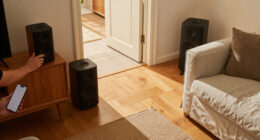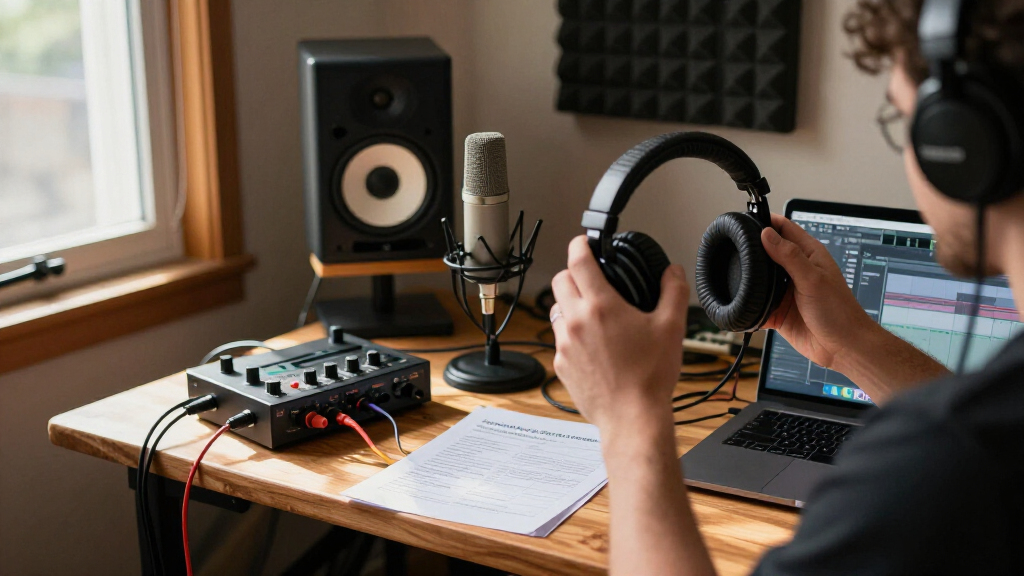
If you’re diving into the world of music production or upgrading your existing setup, having the right audio gear is essential for capturing and creating high-quality sound. This checklist is designed for musicians, producers, content creators, and audio enthusiasts who want reliable, professional-grade equipment to elevate their craft. Whether you’re setting up a home studio or enhancing your recording space, you’ll find key recommendations organized to guide your purchasing decisions.

Get audio and creator gear delivered free — and shop member deals
- Fast, free delivery on millions of items
- Access to Prime Big Deal Days deals on October 6–7
- Prime Video, Amazon Music and more included
The guide is structured into specific categories, each highlighting a top product and offering practical buying advice. Use this checklist as a quick reference to compare features, identify what to prioritize, and avoid common pitfalls like mismatched equipment or overlooked compatibility issues. Remember, choosing gear that suits your needs and space will make your creative process more enjoyable and productive.
Feel free to review each section carefully, focusing on the highlighted features and recommendations. Take your time to consider your specific requirements, such as the type of microphone for vocals or the size of your studio monitors. With this approach, you’ll be well on your way to building a balanced and effective music setup that supports your artistic goals.
Microphones
The LEWITT PURE TUBE Studio Tube Condenser Microphone is a fantastic choice for capturing warm, detailed vocals and instruments. Its tube design adds a rich character to recordings, making it ideal for vocals, acoustic instruments, and even voice-over work. When selecting a microphone, consider the polar pattern, sensitivity, and compatibility with your audio interface. Many beginners make the mistake of choosing a microphone without considering the environment; a condenser is generally more sensitive and works best in treated spaces. Proper placement and gain settings are essential to maximize quality and minimize noise.
Another common mistake is overlooking the connection type—make sure your microphone’s output matches your audio interface inputs. Pay attention to phantom power requirements, as condenser mics need +48V phantom power, which most interfaces provide. Investing in a sturdy mic stand and pop filter will also help you achieve cleaner recordings. The size and weight of the microphone might influence your choice of shock mounts and shock mounts, so check compatibility beforehand.
What to look for:
- Condenser capsule size and type
- Polar pattern options
- Compatibility with existing audio interface
- Phantom power requirements
- Included accessories (shock mounts, pop filters)
LEWITT PURE TUBE Studio Tube Condenser Microphone

The LEWITT PURE TUBE is a professional studio condenser microphone designed for high-quality vocal recordings. It features a transformer-based filter for balanced sound and includes accessories like a pop filter, shock mount, and transport case.
Pros:
- Premium sound quality suitable for professional recordings
- Transformer-based filter provides musical proximity effect control
- Includes comprehensive accessories for convenience
Cons:
- May require specialized knowledge to operate effectively
- Tube microphones can be sensitive to environmental conditions
Best for: Vocals and acoustic instruments
Not ideal for: Loud, high-volume sources
Bottom line: A versatile tube condenser for studio-quality recordings.
Audio Interfaces
The Music Production, Pro Edition: Advanced Studio & Recording Techniques audio interface is a cornerstone for any serious home studio. It provides high-quality analog-to-digital conversion, low latency, and multiple input/output options, making it suitable for recording vocals, instruments, and even podcasts. When choosing an interface, consider the number of inputs and outputs you need—more channels mean greater flexibility for multi-mic setups or live recordings. Avoid rushing into a model with features you won’t use; instead, focus on durability, sound clarity, and expandability.
Many buyers overlook the importance of compatibility with their computer system and DAW (Digital Audio Workstation). Check the connection type—USB, Thunderbolt, or FireWire—and ensure driver support for your OS. It’s common to underestimate the benefit of built-in preamps and phantom power, which influence your overall sound quality. Also, consider the size and portability if you plan to record on the go. Properly matching your interface to your existing gear will streamline your workflow and improve your final output.
What to look for:
- Number of inputs and outputs
- Compatibility with your computer and DAW
- Preamp quality and phantom power
- Build quality and durability
- Included software and driver support
Music Production, Pro Edition: Advanced Studio & Recording Techniques for Produc

An advanced guide to professional music production, covering studio and recording techniques. Intended for producers, artists, songwriters, and audio engineers looking to refine their skills.
Pros:
- Comprehensive coverage of advanced studio and recording techniques
- Suitable for a wide range of audio professionals
Cons:
- No description or review content available to verify details
Best for: Multi-mic recording and streaming
Not ideal for: Simple solo recordings
Bottom line: A versatile interface for serious music production.
Headphones
The Sennheiser HD 490 PRO Open-Back Professional Headphones are perfect for mixing, mastering, and critical listening. Their open-back design offers a natural, spacious soundstage, allowing you to hear your music as it truly is. When selecting headphones, consider comfort for long sessions, sound accuracy, and durability. Many users make the mistake of choosing closed-back headphones for mixing, which can introduce unwanted sound coloration. Open-back models like these provide a more transparent listening experience, but they leak sound—so they’re best for studio use rather than noisy environments.
Ensure that the headphones fit well and provide adequate isolation from external noise. Check the impedance to match your audio interface or headphone amplifier; higher impedance models typically deliver better sound quality at the cost of needing more power. Replaceable ear pads and cables are also a bonus for longevity. Proper calibration and volume control will help you prevent listening fatigue and achieve a balanced mix.
What to look for:
- Comfortable fit for long sessions
- Accurate, flat frequency response
- Impedance matching your equipment
- Durable construction and replaceable parts
- Open-back design for natural sound
Sennheiser HD 490 PRO Open-Back Professional Headphones

Open-back studio reference headphones with a wide soundstage, precise localization, and a frequency response of 5–36,000 Hz for accurate monitoring. They include two washable, replaceable ear pad sets, a detachable 1.8 m cable, and the dearVR MIX-SE virtual mixing plugin.
Pros:
- Wide soundstage and precise audio localization
- Two ear pad sets with different sound signatures
- Washable, replaceable ear pads
- Detachable cable and included virtual mixing plugin
Cons:
- Open-back design provides limited isolation from surrounding noise
Best for: Mixing and mastering
Not ideal for: On-the-go use or noisy environments
Bottom line: Open-back headphones for transparent sound.
Studio Monitors
The Music Production, Pro Edition: Advanced Studio & Recording Techniques studio monitors are a vital component for mixing and mastering. They provide an accurate representation of your sound, helping you make precise adjustments. When choosing monitors, size, power, and frequency response are key considerations. Larger monitors often deliver deeper bass and broader soundstage but require more space. Many beginners mistake selecting monitors based solely on size or wattage; instead, focus on flat frequency response and clarity to ensure your mixes translate well across different systems.
Placement is crucial—monitors should be positioned at ear level, forming an equilateral triangle with your listening position. Avoid placing them too close to walls to prevent bass buildup. Compatibility with your room’s acoustics and your existing gear is also important. Consider acoustic treatment to complement your monitors and achieve the best results. Proper calibration, including using measurement microphones or software, will help you optimize their performance for your specific space.
What to look for:
- Flat frequency response
- Appropriate size for your room
- Power handling and volume capacity
- Compatibility with your audio interface
- Adjustable bass and treble controls
Music Production, Pro Edition: Advanced Studio & Recording Techniques

This advanced guide focuses on studio and recording techniques tailored for producers, artists, songwriters, and audio engineers. It is part of The Modern Musician Series, offering professional insights for music creation.
Pros:
- Covers advanced techniques suitable for professionals
- Broadly applicable to various music industry roles
- Part of a recognized educational series
Cons:
- May be too advanced for beginners
- No specific format details provided
Best for: Mixing and mastering
Not ideal for: Casual listening or portable use
Bottom line: Accurate monitors for studio-quality sound.
MIDI Controllers
While this guide doesn’t feature a specific MIDI controller, selecting the right one depends heavily on your workflow and setup. Consider the number of pads, knobs, and faders you need for your production style. Compatibility with your DAW and software is essential—look for controllers that integrate seamlessly with your preferred programs. Size and portability might also influence your choice if you perform live or have limited space. Many users overlook the importance of build quality; a sturdy, responsive controller will last longer and provide better tactile feedback.
Don’t forget to check for customizable mappings and software bundles that enhance your creative options. Whether you’re sequencing beats, controlling virtual instruments, or automating effects, your MIDI controller should feel intuitive and comfortable. Avoid choosing a model that lacks sufficient controls or is incompatible with your setup, as this can hinder your workflow and creativity.
What to look for:
- Number of pads, knobs, and faders
- Compatibility with your DAW
- Build quality and responsiveness
- Size and portability
- Software integration and customization options
Audio Cables & Accessories
The Audio-Technica AT-LP120XUSB Direct-Drive Turntable Bundle with Headphones is a comprehensive package for vinyl enthusiasts and those looking to digitize their records. High-quality audio cables are crucial for maintaining signal integrity—look for gold-plated connectors and sturdy shielding to prevent interference. When selecting cables, ensure they match your equipment’s input/output types, such as RCA or 1/4-inch jacks. Avoid cheap, poorly insulated cables, which can introduce noise and degrade sound quality.
Accessories like a reliable turntable and headphones can significantly improve your listening experience. Proper cable management and replacement tips can extend the lifespan of your gear. For turntables, consider features like adjustable tonearms and stable platters for optimal playback. Good-quality accessories help prevent signal loss and ensure your recordings are as clear and accurate as possible. Always check for compatibility with your existing setup to avoid connection issues and maximize your investment.
What to look for:
- Gold-plated connectors
- Shielded and well-insulated cables
- Compatibility with your equipment
- Durability and flexibility
- Additional accessories for maintenance
Audio-Technica AT-LP120XUSB Direct-Drive Turntable Bundle with Headphones, Cable
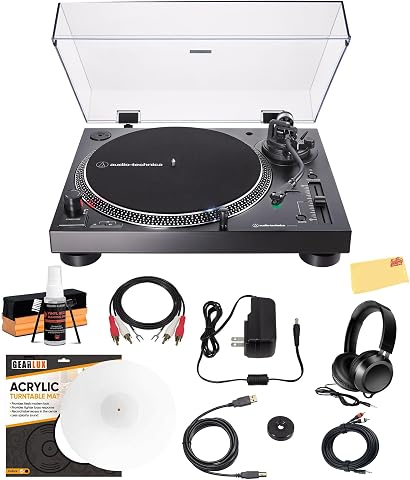
This bundle features the Audio-Technica AT-LP120XUSB, a high-torque direct-drive turntable with selectable 33, 45, and 78 RPM speeds and a built-in switchable phono pre-amp. It includes USB connectivity for digitizing vinyl records and comes with essential accessories such as headphones, a TRS to dual RCA cable, an acrylic slip mat, a cleaning kit, and a polishing cloth.
Pros:
- High-torque direct-drive motor ensures precise speed control and stable rotation
- Built-in USB port allows for easy digitization of vinyl records
- Switchable phono pre-amp offers flexible connection to various audio systems
- Comprehensive bundle includes necessary accessories like headphones and cleaning supplies
Cons:
- Bundle pricing may be higher than purchasing the turntable alone
- No price information provided to assess value against standalone options
Best for: Vinyl playback and digitization
Not ideal for: Casual listening without setup
Bottom line: Reliable cables and accessories for quality audio.
Building a great music and audio setup doesn’t have to be overwhelming. Start by prioritizing your budget and focusing on the core gear that will have the greatest impact on your sound. Whether it’s a high-quality microphone, accurate studio monitors, or reliable cables, investing thoughtfully will pay off in the quality of your recordings and mixes.
Remember, the right gear can inspire your creativity and make your music production journey more enjoyable. Take your time researching each component, and don’t hesitate to seek advice from fellow creators. Happy listening and creating—your perfect setup is within reach!
Fall Picks
fall essentials
As an affiliate, we earn on qualifying purchases.