Hidden cable paths matter in your living room because they keep your space looking tidy and stylish. They reduce clutter, making your room feel more open and inviting. Concealed cords also make it safer by lowering tripping hazards and accidental disconnections. Plus, with fewer visible cables, your room’s aesthetics improve markedly. Incorporating these solutions not only enhances safety but also creates a modern, polished look. If you want more ideas on how to achieve this, keep exploring.
Key Takeaways
- Hidden cable paths maintain a clean, modern aesthetic by reducing visible clutter.
- Concealed cords minimize tripping hazards and improve overall safety.
- Organized cable routing prevents tangling and damage, enhancing device longevity.
- Integrated cable management features in furniture simplify setup and access.
- Reducing exposed cables creates a more inviting, functional, and visually appealing living space.

Have you ever struggled with unsightly cables cluttering your living room? It’s a common frustration, especially when you want your space to look clean and inviting. Hidden cable paths can make a huge difference in transforming your living area from a tangled mess into a sleek, organized space. By planning smart cable routes, you can hide cords behind walls, beneath floors, or within furniture, reducing visual clutter and creating a more polished look. This not only improves aesthetics but also makes your space safer; fewer exposed cables mean fewer tripping hazards and less risk of accidental disconnections.
In today’s tech-driven world, wireless solutions are becoming more accessible and reliable, offering you the chance to cut the cord altogether for many devices. Wireless streaming devices, Bluetooth speakers, and wireless charging stations help eliminate the need for numerous cables snaking across your living room. When combined with well-planned hidden cable paths, these wireless solutions give your space a modern, minimalist feel. You won’t have to worry about hiding cords for every device, because most of the technology becomes wireless, simplifying your setup considerably. It’s a seamless way to keep your living room clutter-free while maintaining easy access to your electronics. Incorporating wireless technology into your setup can significantly reduce the number of cables you need to manage.
Furniture integration is another key aspect of creating a tidy environment. Well-designed furniture can hide cables behind drawers, within hollow legs, or under built-in compartments. For example, entertainment centers with dedicated cable management channels allow you to conceal cords from your television, gaming consoles, and media players. When you choose furniture with integrated cable management features, you make it easier to hide cables without sacrificing style or utility. This approach keeps your living room looking neat and ensures cables are out of sight but still accessible when needed. Incorporating cable management features into your furniture design enhances both safety and aesthetics, making the space more functional and visually appealing. Additionally, understanding the importance of organized cable routing can significantly improve your overall space management. Using smart cable systems can further streamline your setup and reduce clutter, making your living room more efficient and visually appealing.
Furthermore, understanding cable concealment techniques can help you achieve a truly polished look, hiding even the most stubborn cords effectively. Combining furniture integration with clever cable routing creates a harmonious space that feels thoughtfully designed and clutter-free.
Ultimately, hidden cable paths matter because they enhance both form and function. They turn a chaotic, cable-ridden room into a sleek living space that invites comfort and sophistication. Wireless solutions reduce the need for many cables in the first place, while furniture integration offers a practical way to conceal the remaining cords. Both strategies work together to create an environment that’s visually appealing, safer, and easier to maintain. When you invest in these thoughtful cable management techniques, you elevate your living room from a simple gathering space to a sleek, organized haven where technology seamlessly blends into your décor.
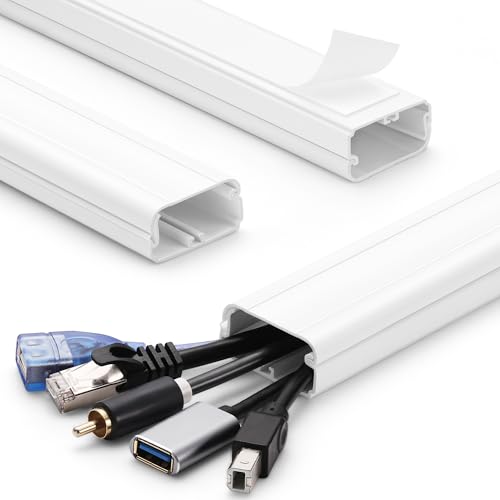
TV Cord Hider – 39in(3xL13in) Cord Covers for Wall Mounted TV Cable Hider Wall Kit | Wire Hiders for TV on Wall, Wire Covers for Cords, Cable Concealer Hide Cords, 1.5" W x 0.75" H, White
- Large Capacity TV Wall Cord Hider: Can hide 3 to 6…
- 3-Section Package Cable Cover Wall Kit: Each cable raceway length is…
- Quick Tool-Free Installation: The TV cord cover kit…
As an affiliate, we earn on qualifying purchases.
As an affiliate, we earn on qualifying purchases.
Frequently Asked Questions
How Do Hidden Cable Paths Impact Room Aesthetics?
Hidden cable paths remarkably improve your room’s aesthetics by providing cable concealment, making your space look cleaner and more organized. When you hide cables, there’s no clutter or tangled wires distracting from your decor, which enhances the overall visual appeal. You’ll enjoy a sleek, modern look that feels more inviting and less chaotic. Cable concealment isn’t just practical—it’s a simple way to achieve aesthetic enhancement in your everyday living room.
Are There Specific Tools Needed for Installing Hidden Cable Paths?
You’ll need a few essential installation tools for creating hidden cable paths, such as a drill, screwdriver, cable clips, and a stud finder. These tools help with cable management, ensuring your cables stay organized and out of sight. A utility knife might also be handy for trimming cable covers or conduits. Using the right tools makes installation easier, safer, and more professional-looking, giving your living room a clean and clutter-free appearance.
Can Hidden Cable Paths Be Adjusted After Installation?
Yes, hidden cable paths can be adjusted after installation. You’ll need to access the wall for cable concealment, which often involves removing a panel or using wall access points. Carefully open the wall access, then gently move or reroute cables as needed. Be sure to disconnect power beforehand, and use appropriate tools to avoid damaging the wall or cables. Once adjustments are complete, securely close the access to maintain a clean, hidden look.
Do Hidden Cable Paths Affect Wi-Fi Signal Strength?
Hidden cable paths typically don’t directly affect Wi-Fi signal strength, but they can contribute to wireless interference and signal attenuation if cables run near routers or antennas. When cables are concealed, make sure they’re kept away from Wi-Fi devices to avoid interference. Properly managing cable placement helps maintain strong, reliable signals, reducing disruptions. So, hiding cables won’t harm your Wi-Fi, but mindful placement prevents wireless interference and signal attenuation.
What Safety Precautions Should Be Taken During Installation?
You should always follow safety guidelines during installation, even when cable management seems straightforward. Ironically, neglecting safety can turn a simple task into a hazardous mess. Use insulated tools, turn off power sources, and avoid overloading outlets. Secure cables properly to prevent tripping or damage. Prioritize safety to guarantee your cable management doesn’t become a shocking experience, and always double-check connections before powering up.

Changsuo Cable Management Box with Bamboo Lid Small Cable Organizer Box for Extension Cord Power Stripe Surge Protector Wire Management Concealer Organizer Cover Hider (Black)
- Versatile Cord Hideaway: Hides cords on countertops, nightstands, floors
- Spacious Interior: Fits 4-6 outlet surge protectors, 12x5x4.5 inches
- Child and Pet Safe: Keeps kids and pets away from cables
As an affiliate, we earn on qualifying purchases.
As an affiliate, we earn on qualifying purchases.
Conclusion
When you hide cable paths, your living room transforms into a sleek, clutter-free oasis—like a well-orchestrated symphony where every instrument plays in harmony. You’ll enjoy a cleaner look, fewer tripping hazards, and a space that feels more inviting. It’s not just about aesthetics; it’s about creating a sanctuary where technology seamlessly blends into your life. So, take control of those hidden paths and turn chaos into calm—your living room will thank you.
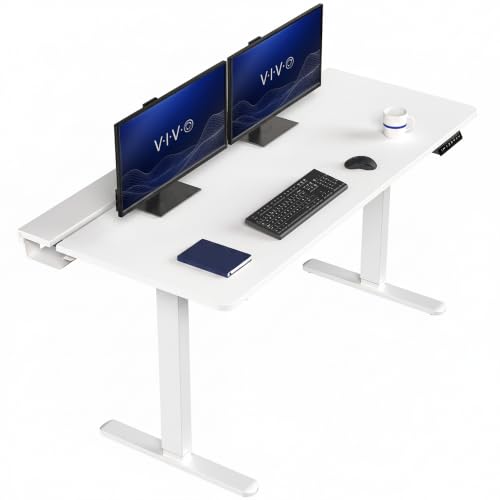
VIVO White 60 x 30 in Standing Desk, DESK-KIT-1W6-P3W
- Instant Active Standing: Switch from sitting to standing smoothly
- Customizable User Heights: Adjust to preferred ergonomic positions
- Built-in Cable Management: Conceal cables with integrated trays
As an affiliate, we earn on qualifying purchases.
As an affiliate, we earn on qualifying purchases.

YesBes 116in Cord Hider Kit, Cord Covers for Wires on Wall, Paintable Cable Raceway, Cord Hider for Wall Mount tv, tv Cable Hider Wall kit, Wire Covers for Cords, W0.96in X H0.57in, White
- Kit Length and Dimensions: 116 inches long, 0.96×0.57 inches
- Complete Installation Kit: Includes couplings, elbows, T-fittings, instructions
- Easy to Install: No screws or drilling needed, strong adhesive
As an affiliate, we earn on qualifying purchases.
As an affiliate, we earn on qualifying purchases.